LECTURE 11: Bus Systems, LANs, WANs
Communication:
bit-streams
All information that the computer handles is digital. How is this information communicated between the various chips in the computer, and how do computers communicate information between each other ? To understand this, we shall study the basics of digital communications.
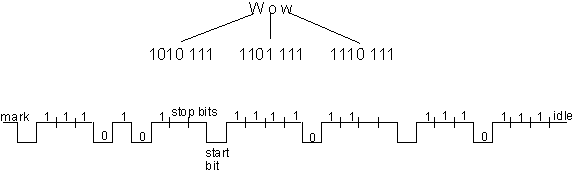
The digital information is in the form of a bit-stream, literally a string of high/low voltage levels representing 1 or 0. Take for instance, the transmission of the message "Wow" from one device to another. Using ASCII codes, the signal sent across the wires would look like:
Figure 10.1. A simple bit-stream
The popular ways of connecting the communicating devices is by wire; twisted pair and coaxial cables (very similar to your TV cable) are commonly used.
Connections: serial, parallel
Notice how the 7-bit ASCII code was first converted to a string of 1/0 pulses, so that a single wire can be used to transmit the information by serially sending out the data, bit-by-bit. Such a communication channel is called a serial connection. On the other hand, if we had seven separate wires connecting the devices, we could send out an entire character simultaneously, or in parallel.
Inside the computer, most chips are connected by such parallel connections, with 8, 16, or even 32 wires (recall that 8 bits = 1 byte).
What is the main advantage of using parallel connection ?
What are the disadvantages ?
Expensive.
Variable delay over large distances create synchronization errors.
The implication: parallel lines are used to connect devices that are physically close together. Even though the serial connections create overheads including hardware for serialization, adding control characters, formatting the data into frames, etc.
A frame is a sequence of contiguous bits, bracketed by opening and closing flags, sent serially across a channel. A frame contains its own error correction data and addressing information.
Synchronous/Asynchronous
What are some of the main concerns while transmitting data ? The most important is, of course, that the message received should be the same as the message sent. The first consideration for this is that the transmitting and receiving device must be using the same functions for encoding/decoding data. This is the same as communication between humans - where each should be speaking the same language for any meaningful interaction.
The first concern is that of ensuring the transmitting and reading of data is at the same clock-rate. That is, the receiver must know when to read out the next bit of information.
Apart from maintaining the same clock rate, there is another problem: communication is not continuous, i.e. there are periods of time when there is no information being transmitted. To handle this, serial data links communicate in either of two modes: synchronous or asynchronous.
In Synchronous transfer, data octets are sent continuously, without start/stop bits. The receiver clock is derived either from the signal itself, or an extra wire is run between the devices, and carries the clock signal. A block of data is framed between sync characters.
The synchronous receiver starts in search mode, hunting for a sync character (in ASCII, this is the character 1001 0110) in the bit-stream. Sometimes two sync characters are sent to ensure against false alarms. After recognizing the sync, each next eight bits are shifted to the data register, and a character available flag is set after each 8 bits. The receiving computer can now read the characters. The block is ended by a count of the number of bytes, and finally, the end sync bit. Figure 10.3 shows the communication.
Figure 10.4 shows some of the actual configurations used for synchronization.

Figure 10.3. Synchronous data transfer
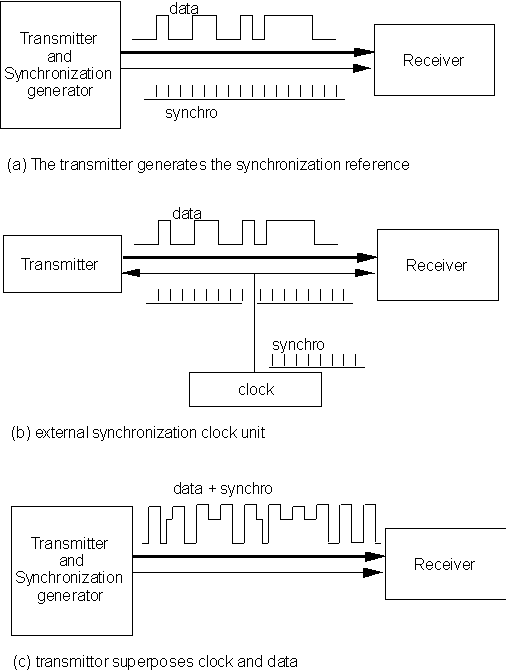
Figure 10.4. Modes of synchronous communication
Asynchronous transmission includes information start-stop and timing information with the signal. Each asynchronous character is framed between a start-bit, which is of opposite polarity to the idle state of the line; and one or more stop-bits, which are of the same polarity as the next idle state of the line. Depending on the hardware used, there may be 1, 1.5, or 2 stop-bits. Figure 10.2 shows one character frame.
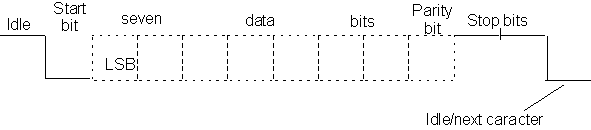
Figure 10.2. Asynchronous 7-bit character with parity
Asynchronous transfer does not require precise synchronization between the transmitter and receiver. The characters may be sent at random intervals or continuously. Of course, booth devices must know of the transmission rate.
Bit coding
Up to now, we have assumed that the signal is basically a high voltage for a "1", and a low voltage for a "0" bit. Practically, this is not a good choice. Firstly, if there is a sequence of "1"s (or "0"s) in a signal, the line effectively is carrying a DC signal for that duration. Any capacitance/inductance in the wires/carriers will charge up in this period, causing disturbances in the signal. Also, direct signals are easier to corrupt due to electro-magnetic disturbances in the environment. There are other ways of coding the two distinct binary states ( "0" and "1") which lead to better noise immunity. The four most common ones are shown in figure 10.5. Note that the return-to-zero scheme requires detection of 3 different voltage levels, and the associated electronics are more complex. The most popular of the schemes are the Manchester coding (where each bit is coded by two voltage levels, and a transition from low->high is a 0, while from high->low is a 1), and the differential Manchester (where the bit "0" is represented by a level transition at the beginning of the period, and bit "1" by absence of a transition).
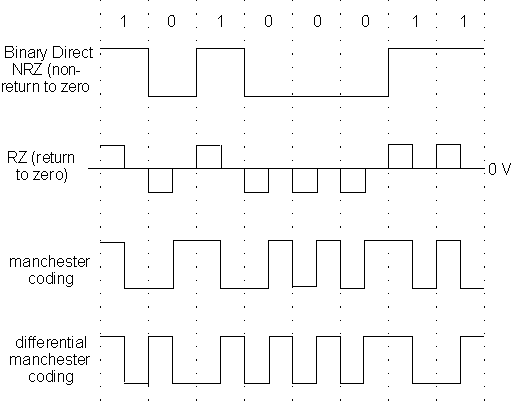
Figure 10.5. Bit coding techniques. Note that the 0 volts level is relevant only in the RZ coding; in other schemes, the absolute value of the voltages is irrelevant. Typical values for the two levels are 0 V and 10 V, or ±5 V.
Modulation: Amplitude, Frequency
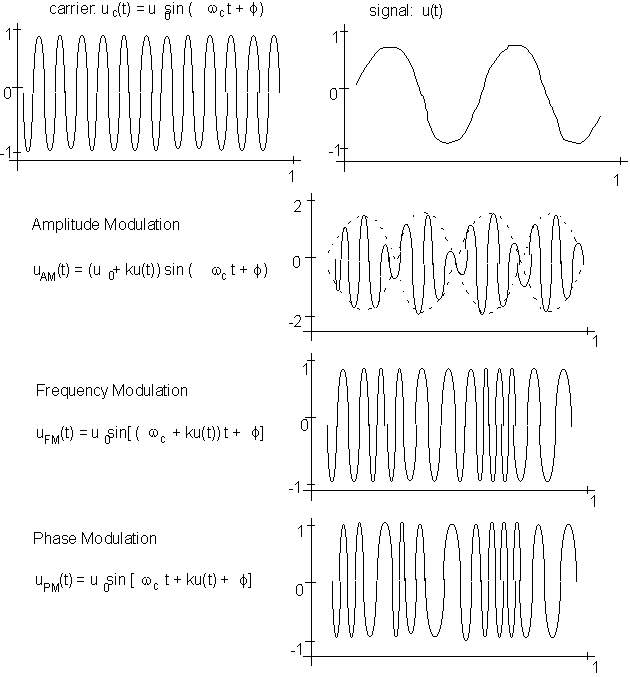
Figure 10.6. Modulation of signals
When communicating between computers located some distance away, for instance, using modems, phone lines are used to transmit data. Some communication may be carried out via satellite communications. The phone wires are designed to carry human voices, and operate best within a range of 330 Hz and 3400 Hz (Broadcast radio signals use frequencies of 100 KHz to 30 MHz.) In order to use such media to transmit binary data, an electronic trick called modulation is used. A base frequency signal is generated (called the carrier) with its frequency in the range of the communication medium. The binary data is then superposed on the carrier to modify it. At the receiving end, the receiver first filters out all the carrier frequency, thereby retrieving the original bit-stream. The modification of the carrier can be realized in many ways, the simples of which are amplitude modulation, frequency modulation, and phase modulation. Figure 10.6 shows the basic principle used in modulation.
Error Detection and Correction
It is extremely important that the error rate in data communication be very low indeed. If the transmitted data is not reproduced exactly, most communication would be useless. For instance, an average sentence of text contains 125 characters. This equals 125 x 8 = 1000 bits in ASCII. With an error rate of 0.1%, on an average one error would occur on each sentence of communicated data! In reality, error rates are maintained at many orders of magnitude lower than that. How is this done ?
There are several mechanisms for error detection and correction. We shall briefly look at four such methods.
The simplest, which uses a parity bit in each byte, has already been mentioned before. The receiving system checks the parity of each byte received, and if it does not match the parity agreed upon before communication began, it sends a message back to the transmitter, requesting re-transmission of that byte.
Another method is called the cyclic redundancy check (CRC). The test basically takes a block of data (usually about 32 bits), and treats it as a large integer number. It then divides this number by a predetermined integer number, and attaches the remainder (usually 16 bits) to the end of the block. The receiver, on getting the number, again performs this division, and if the resulting remainder does not match the attached one, an error is detected.
Another simple method of error reduction is repeating. The message is repeated, usually twice, but sometimes even thrice, and the majority occurrence of each bit is selected. There are other methods based on redundant information transmission, the more popular ones being hamming codes and reed-muller codes. Each method has some amount of redundant information added to the raw data which enables re-constructing the original data from a corrupted transmission.
An interesting method of using redundant information is called interleaving. It is particularly useful in systems where data corruption is due to interference (e.g. by radio frequencies in the shop floor). Such interference causes what are known as burst errors, where many contiguous bits are corrupted. Say the original bit-stream contains 32 bits, and looks like: b1 b2 b3 b4 ... b32.
In interleaving, this is re-written as b1 b9 b17 b25 b2 b10 b18 b26 b3 ... b24 b32.
This can be looked upon as writing the bit-stream row-wise into a 8x4 matrix, and then reading it out column-wise. This interleaving ensures that the neighboring bits that get corrupted belong to different bytes of information. The small amount of damage to the data per byte can be then re-constructed via the redundant coding.
It may be of interest to some that the music compact discs use reed-muller codes and interleaving. This is why most CD players will play music without a problem even if there are small holes in the compact discs, destroying data locally.
Connections: Simplex, Half-duplex, Full duplex
Note that while CRC and parity are error detection methods, the other two actually allow for correction of data without the need for re-transmission. This results in a significant difference in the configuration of the communication wires between devices using one of the first two and those using one of the latter two.
What is it ?
Communicating devices are connected in one of three possible ways: simplex, half duplex, and full-duplex. These are described as follows:
Simplex: Transmission in one direction only (this is used only for purely receiving devices, such as printers.)
Half-Duplex: Transmission in one direction at a time.
Full-Duplex: Simultaneous transmission in both directions is possible.
Networking: topologies
Now we have a reasonably good idea of how pairs of devices communicate with each other. For instance, to make two PC's communicate, one could hook a wire between their input/output ports (most PC's now come equipped with at least one parallel port, and a couple of serial ports). Any programming language (even BASIC !) provides some functions that allow specification of communication characteristics, such as parity, and then anything text written to the output port of one can be read off the input port of the other. Of course, most software packages do all the hard work of encoding/decoding for you, so that communicating between computers may be as easy as opening a file, writing into it, and opening the received file at the other end and reading from it. Which is exactly what you do when you, for example, email a note to your friend.
But behind all this simplicity lies the complex world of computer networks. Some understanding of networks (in other words, how are multiple computer hooked to each other so that each can communicate with any of the others) is essential to have the ability to set a good computer system in the factory that you plan to own after you graduate.
The simplest way to connect two computers is to hook them up using a cable.
If you had two computers, and wanted them to communicate, you need only one cable.
What if you had ten, and wanted each to communicate with the other ?
As you can see, connecting computers pairwise is not wise. The problem is solved by connecting them by one or a few cables in such a way that each can communicate with the others.
The reason this is effective is simple: most of the time that a computer is being used, it uses it's own hardware; only occasionally does it need to communicate with other computers. During the time it is working on its own, the communication cable is unused. It can therefore be used by some other computer, which is transmitting information at that time.
There are many ways to connect multiple computers (or nodes, to use the networking jargon). The configurations are called topologies. Figure 10.7 shows the more popular ones. In the figure, each line connecting two nodes is assumed to be capable of providing a full-duplex connection.
Each topology can be evaluated in terms of throughput, maximum distance, maximum number of stations, vulnerability to link failure, message delay and cost.
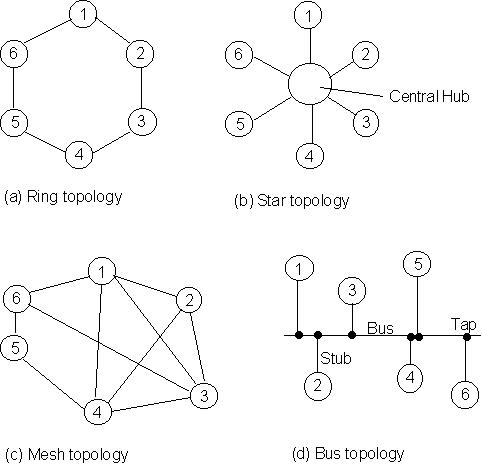
Figure 10.7. Some network topologies
The ring topology has each node connected to exactly two other nodes: the transmitting device communicates with the next node, and the receiver is connected to the previous node. Any message passing between non-contiguous nodes are relayed on by the intermediate nodes. Such a topology is used exclusively in local area networks, and is quite common. Rings are vulnerable to communications failure due to single link failure. Message delays increase as the number of nodes increases. The transmission is governed by protocols such as token-passing or slotted token access, which shall be described below.
The star topology requires a central hub, or switching node. Each message received is examined for its destination address, and sent on the appropriate line. Such a topology is commonly used in linking several small computers (e.g. PC's) to a mainframe, and in private branch exchanges (PBX's). The maximum number of nodes is usually limited by the switching capacity of the hub. Single cable failure causes only one link to break, but the failure of the central hub will break down all communications. Message delay may be high, due to message queuing at the hub.
The mesh topology has each node connected to arbitrary number of nodes. These are commonly used for long-distance transmissions. The multiple message paths reduce the vulnerability to individual link failures, since alternate routes may be found to transmit data. Message delay may be high, since long-distance transmissions usually have low transmission rates.
A bus topology has a single cable running across the entire networked area. Each node is connected to the network by connecting a tap on the bus. Bus networks are very common in local area networks. Throughput decreases as the number of nodes increases. Adding new nodes to a bus system is quite easy.
Since the cables are shared in a network, how do we know which devices are communicating ?
This is done by adding some more information to the data being sent. Each node is assigned a unique address (called its network address). All machines on the network know each others' address. The address of the transmitting and the receiving machines is added to the front of the data being sent.
There are other considerations. Suppose node A starts to send out a message which is extremely long (say a very large executable file). In that duration, no other node could communicate. Also, if, for some reason, a small part of the message from A is corrupted and cannot be corrected at the receiving machine. Then the entire message will have to be re-sent, wasting a lot of time. To ensure against this, a simple strategy is used: each message is divided up at the transmitting end into small sized blocks, called packets. Each packet is made up a few Kbytes of data or less(depending on the communication protocol). Included in the packet, apart from all the information mentioned above is information about how to reconstruct the entire data by collating all related packets together (for instance, which file the packet belongs to, and where does the packet fit in). Figure 10.8 shows a simplified view of packet creation.
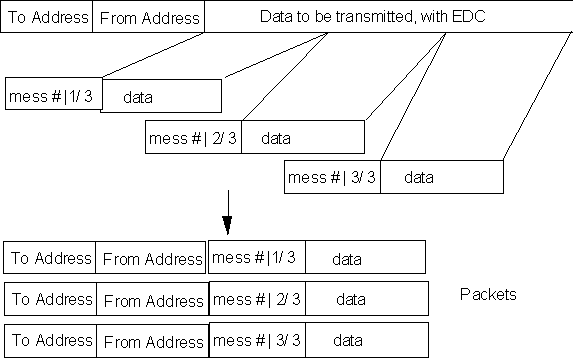
Figure 10.8. Forming packets from large data sets
What are the advantages of using packets ?
To complete this description of networks, let us make a simple analogy between networks and the postal system.
• both provide communication.
• both use shared resources to save effort/congestion: networks use shared cables; the postal system itself is shared by all of us. If every individual delivered his/her own letters, communication would be slow and inefficient.
• both use protocols (or conventions). In digital communication, the protocols dictate the start/stop bits, error detection and correction, packet size, addressing, etc. In postal systems, it is the use of envelops (or packets), addressing formats, addressing language etc.
• In both, there are concerns of privacy, which are handled by protocols and directives. The post office does not open/read contents of the envelop - but only reads the address; similarly, each node in the network will only pass messages addressed to it to the computer, while channeling all other messages forward on the lines.
Protocols..
In all the above descriptions, we see more and more the use of the word protocol. The reason is simple. When trying to communicate between various devices, each being designed/built by different companies, unless there are protocols, communication would require incredible effort. For each pair of communicating devices, we would require a pair (one at each end) of interpreters. As we study layered architecture of networks, LAN's and WAN's, the need and use of protocols will become clearer.
LAN
Local Area Networks, or LANs are digital communication networks established over a small geographical area (examples: the IE dept, the shop-floor of a small factory). Probably the largest separation between devices on a LAN is of the order of 2-3 Km.
The motivation behind the development of LANs included:
• providing users with access to several computers simultaneously
• sharing files
• sharing resources like hard disks, printers etc. between many computers
• sharing access to wide area networks (WANs)
• providing email and other communication services to offices.
As mentioned before, the most popular topologies used to connect LANs include bus and ring structures. Since LANs are connected over short distances, data rates are pretty high (up to 100Mbit/sec). In fact, the HKUST uses a fiber-optics technology based LAN, called the FDDI (Fiber Distributed Data Interface) to achieve as high as 3.6Giga bit/sec ! The topology for the HKUST LAN is a hybrid. The FDDI uses a ring topology. Each node of the ring is connected to a special computer called a bridge. Each office/Department/lab has it's own set of devices and computers which are connected in a bus topology. Each bus is connected to one bridge on the FDDI to hook up the entire university.
Some of the popular protocols that are used in LANs to communicate are briefly introduced below.
Broadband: Commonly used in large offices and business complexes. Broadband LANs use separate channels for point-to-point or multiple access, together with analog channels such as speech or video. The physical medium of communication is the same as coax cable used in TVs. A process called frequency domain multiplexing (FDM) is used to transmit several channels of information on carriers that may range from 300 Hz to 400 Mhz.
CSMA/CD: (Carrier Sense Multiple Access with Collision Detection). This is a protocol used in many LANs (the most notable being Ethernet) which dictates how packets of information are transmitted across a network. Consider the following problem:
A bus network has computers A and B. When A begins transmitting a message. While it is still going on, B starts to transmit a message. Clearly, the shared cable will, at this time, have voltage levels being set at two nodes, and all messages will get messed up. CSMA/CD is one way to solve this problem. The principle is simple: any node that wants to transmit monitors the network line. When it senses a line idle, it begins to transmit. Unless the line is idle, transmission does not begin (hence the carrier sense part of the name). However, electric signals do take some time to propagate across wires (of the order of 5
msec per kilometer). There is a chance that A begins transmission, and, say 1msec later, B senses an idle line and also begins transmission. Therefore, each node, when it starts to transmit a signal, simultaneously monitors the line voltages. If the data read off the line is not the same as what it is sending, clearly there is a simultaneous broadcast (a collision is detected). when this happens, both channels stop transmitting, and each generates a random delay interval (of the order of milliseconds) and then tries to transmit again. Clearly, since the wait period for the two computers is different, there is small chance of repeat collision.
Token based LANs: CSMA/CD has a stochastic element to it, which brings up the probability (very small) of long wait periods in times of high communication volume. Two token-based protocols were defined for use in LANs which were more deterministic in terms of maximum wait time before certain access to the network for each computer. A token is a special bit-stream (which is selected such that it is extremely unlikely to be part of any message). When a node on the network receives the token, it may capture it, and start transmitting a packet of information. Once the transmission is complete, it releases the token into the line, giving the next node the chance to transmit. One token capture allows transmission of only one packet, so each node is guaranteed access to the network in a fixed time (how much ?).
Token based systems may have a bus or a ring topology. Both are popular. Token bus is used as a standard in MAP (Manufacturing Automation Protocol) which is becoming the protocol of choice for most shop-floor based LANs across the world.
Slotted Rings: are another deterministic method of avoiding collisions during transmission, used in some ring topologies. A slot is an interval of time slightly longer that the time required to transmit one packet. At the beginning of each slot, a bit (denoting slot free/used) is transmitted. If the slot is free, the transmitting node can dump the packet into it, set its slot-used bit, and send it out. The receiving node reads the data, and if no errors are discovered, sends the slot back into the ring. When the slot reaches the transmitting node again, it re-sets the slot-used bit to slot-free, and sends it back into the cable. No immediate re-use of slots is allowed - since this would allow monopolizing the network by one node. Figure 10.9 shows the principle.
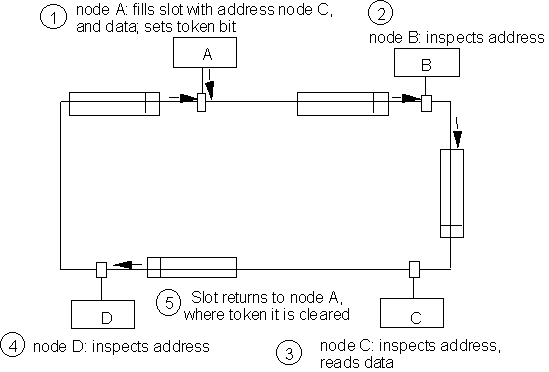
Figure 10.9. Slotted ring protocol
WAN
Wide area networks are networks across large geographic areas (e.g. between cities, countries etc.). The characteristics of WANs when compared to LANs are:
• propagation times are much longer
• data transmission rates are lower
• error rate is much higher
• links are more prone to failure, and alternative routes (including network reconfiguration) must be planned into the WAN
• data transmitted over WANs frequently travels through different media, which may run different protocols (including different packet sizes, addressing schemes).
Some of the different media that are currently in use for long distance communication (including many WANs) are the following:
• conducting wire cables (twisted pair/coaxial)
• optical cables (using fiber optics)
• radio waves/ microwaves
• satellite communication channels
Practically all WANs which run across countries subscribe either to satellite time leasing organizations (such as NASA of the US) or phone companies (e.g. AT&T, or Hong Kong Telcom etc.)
Protocols !!
As you have seen, the one word that came up many times in discussions of the many aspects of communications was protocols.
Why is it important to have protocols ?
A simple example of the inconvenience and expenses associated with lack of good protocols is the that of electric plugs in HongKong. The domestic sockets are built based on size/shape protocols inherited from the British systems. Much of the electrical and electronics equipment (refrigerators, TVs etc.) are designed in Japan (or US), and the connecting wires are therefore designed using a different protocol, and have different sizes. So each time you buy some equipment, you have to buy an adapter socket to connect it to the power supply. In fact, if the equipment is designed for use on 110V AC, you also need to purchase a step-up transformer.
The problem is much larger in case of digital communication. If each company producing computer related products follows its own design specifications, nothing could be connected directly to other products. In a large manufacturing company, using computers, printers, NC and CNC machines from different vendors, bar code scanners, and hundreds of software packages this could create a mess: to connect each pair of equipment connected, you need two adapters. Further, for each software running on a computer, you would need an interpreter (two way) so that the software could interact with one other.
In the 1980's, General Motors (USA) found that 50% of their costs of automation were directly related to adapting/interpreting problems. In short, problems of a lack of protocol. Similar figures were being faced b many other manufacturing giants.
What, then, is a protocol ?
It is a published standard for some entity (physical entities like sockets, cables, etc., or data entities such as software, functions, etc., or even conceptual entities such as structure of packets of information, frames, etc.) which specifies all those details of the entity that play a role in how the entity interacts with others.
It is important for the standard to be published, and freely available, since this way all manufacturers of equipment can make sure that every item they design follows the protocol. This would enable direct coupling of OEM products (OEM stands for Original Equipment Manufacturer, and refers to accessories and peripherals manufactured by different companies that can be added as options to a basic product such as a computer or a car).
Layered Network Architecture
Digital communication involves literally thousands of different entities. Besides, many of these entities are software programs (that, for instance, break data into packets, or unite packets to recreate a message), and it is difficult to break down the entire field of communication into well defined little entities. The functions performed by one procedure may overlap some of the functions performed by two or more others, using a different algorithm. To simplify this, an elegant solution was devised: layered network architectures.
The idea is simple. All communications entities are first divided into a broad classification. The lowest layer is made up of the group of physical entities that are used in communications (wires, cables, connectors and so on). Most of the layers above this are comprised of sets of functions. For instance, the layer just above the physical layer is the set of functions that directly place data on the physical lines. The layer above that one would be the set of functions that call the functions of this layer to perform more complex tasks in creating the message to be communicated, and so on. The functions in any layer can be looked upon as services provided by that layer to the layer directly above it. The layer above looks upon these services as procedure calls. Thus any layer N can perform all the functions of the layer (N - 1) [ by making procedure calls to that layer], and also do some more activities in addition. The services provided by layer N are therefore more sophisticated than those of layer (N - 1). Each layer adds value to the services of the previous layer.
Each communicating device (e.g. two computers) following the same protocol divide up their functions in the same layers. by doing so, any entity on a given layer on one device can communicate with its corresponding layered entity on the other device. This establishes a virtual link between each two corresponding layers on the two computers. The link is virtual since there is no physical link at any layer except the physical layer.
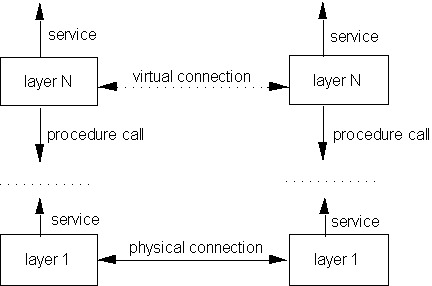
Figure 10.10. Peer-to-peer communication in layered networks
Each layer on a given machine can only be connected to the layers one level below/above it. Also, a given layer on one machine can only communicate (via the virtual link) with the same level layer on another machine.
Communication between two machines: peer layers can "see" the virtual link, and communicate via the virtual link. The actual data can only be transmitted via the physical link. Remember that the Layer N services are defined in terms of procedure calls to layer (N - 1). The message to be communicated therefore is passed down the layers of the transmitting machine, till it reaches layer 1, which transmits the message to layer 1 of the receiving machine, where the message is relayed up the layers till it arrives at the peer layer. Of course, at each layer, the data may have been modified (e.g. some layer may break down the entire message into packets); therefore, to keep track of the data manipulations (which will be used to reconstruct the original message on the receiving machine), each layer adds its protocol data to the original message. The general idea is shown in figure 10.11.
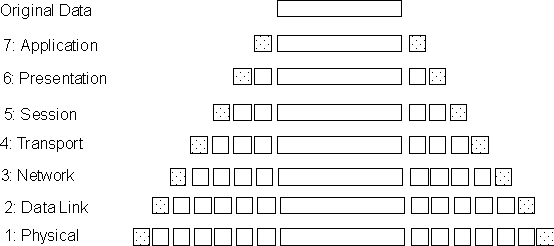
Figure 10.11. Protocol data addition along the layers in a 7-layer architecture
At this point, you may ask (if you haven't, already):
What has all this got to do with me, an industrial engineer ?
ISO/OSI 7-layer architecture and MAP/TOP
The ISO 7-layered architecture for communication, Manufacturing Automation Protocol (MAP), and Technical and Office Protocol (TOP) have been gaining rapid acceptance across the world in all leading companies as the protocols for communication. The thrust of the 90's is to manufacture custom items for each individual's demand in short lead times (e.g. DEC VAX machines, Volkswagen of Germany). In order for all manufacturing to become so flexible, it is essential that communication between factories, and OEM suppliers etc. be quick and efficient. Even manufacturers of small parts for a car (say a door handle) must be able to communicate and respond rapidly to incoming demands.
Flexibility => Rapid, Error-free Communication => Protocols
Figure 10.12 shows the ISO-OSI (International Standards Organization - Open Systems Interconnection) 7-layered architecture for communication.
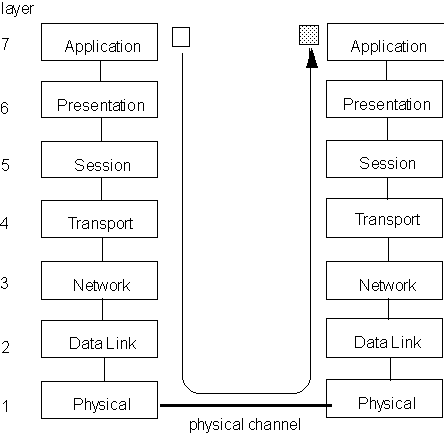
Figure 10.12. The ISO-OSI 7-layer architecture
As mentioned before, each layer communicates directly only with the layers above and below it. The requesting layer passes data and parameters to the layer below it, and waits for the answer. OSI defines all the services that each layer must offer to the layer above it. The services define what to do, and the protocols define message formats and the rules of data exchange.
The seven layers and their roles are described below:
Physical link layer: this consists of electrical, mechanical and optical interfaces with related software device drivers for the communication ports. At this level, all the details about transmission medium, signal levels, frequencies etc. are handled.
Data Link layer: This level takes care of the verification that bit sequences are passed correctly between two nodes. If errors occur due to, say, line noise, then this level requests the re-transmission of the corrupted sequence. The layer provides to the upper layers an error free data link between nodes.
Network layer: This layer sets up a complete path and oversees that messages go all the way from source to destination, even when the actual path is composed of different legs traversing several nodes.
Transport layer: This layer provides the end-node to end-node communication control and acts as the interface between the application software which requests data communication and the external network. It is responsible for checking that data from one machine to the other is transmitted and received correctly.
Sessions layer: This layer enhances the services provided by the transport layer by providing full sessions between different machines. One example is remote login via a network from one machine to another.
Presentation layer: Data encoding and conversion, in which raw binary data is related to its meaning: messages, text, figures etc. is done at this level.
Application layer: The highest layer deals with application system management tasks such as file transfer, distributed database operations and remote control. This is the layer that user programs and processes accessing the network talk to. As a programmer, this is the only layer whose procedures (services) you will use. All the other layers exist solely to support this layer.
MAP (Manufacturing Automation Protocol) is a seven layered communication architecture developed at General Motors (GM) during the 1980's. The reason for its need was that GM calculated that without standards, the number of interfacing devices they would be using in their factory would exceed 100,000 by 1990 ! The specific choices of the protocols and standards made for MAP reflect the fact that its primary use was to connect corporate computers (with information databases, CAD models etc.) to the shop-floor equipment such as PLC's, Robots etc.
Similarly, and around the same time, Boeing Inc., with an aim to standardize the use of communicating devices in their offices developed TOP (Technical and Office Protocol). TOP follows the same standards as MAP, and the motivation for it was a similar need to cut on costs of automation. The only difference between MAP and TOP is at OSI layers 1 and 2, where MAP specifies the use of a Token Bus LAN, while TOP specifies the use of Ethernet.
To summarize: communication between different machines is necessary as we move into automated global manufacturing systems. To make the need even more important, modern factories need to be flexible - that is, they have to produce variations of their basic product which are specifically tailored for the needs of individual customers. To fulfill this demand, automated factories could cut down on many costs and more headaches if they agree to use equipment with standard interfaces. This becomes most important when it comes to communication. Hence the great effort to push for standards such as ISO-OSI, MAP, TOP.