Databases
One of the most common and popular computer tools for automation of data processing is a database system. Practically any organization, of any size, has a necessity to manage a lot of data concerning its dealings including materials, output levels, suppliers, demand schedules, employee information and so on. All of this was done manually, in paper files earlier. Modern factories maintain all information using database systems.
What is a database system?
A concise definition is that a database system is a computerized record keeping system. Its purpose is to maintain up-to-date information about the organization, at the same time allowing convenient access to the data.
We shall restrict our attention to a particular type of database system called relational databases. A better understanding of database systems will be achieved after using some simple examples to study how databases are constructed, and how information is manipulated and accessed.
We begin with a simple example, called the wine cellar:
file: cellar
Bin Wine Producer Year Bottles Comments
2 Chardonnay Buena Vista 83 1 fruity
3 Chardonnay Louis Martini 81 5 dry
6 Chardonnay Chappellet 82 10 Thanksgiving
11 Fume Blanc Ch. St Jean 79 4 Napa Valley
25 Burgundy Mirassou 80 6 sweet
28 Pinot Noir Sattui 85 3 Tina
31 Zinfandel Paul Masson 92 2 Cheap
35 Sauvignon Blanc Ch. St Jean 91 4 dry
43 Cab Sauvignon Robert Mondavi 82 4 Birthday
Some examples of what we can do with this database are:
• Select data to be displayed:
SELECT Bin, Wine, Bottles
FROM cellar
WHERE Year ≥ 85
which results in the output:
Bin Wine Bottles
28 Pinot Noir 3
31 Zinfandel 2
35 Sauvignon Blanc 4
• Insert more records into the file:
INSERT INTO cellar
VALUES( 41, 'Bordeaux', 'Jean Philippe', 88, 2, 'for Nancy');
• Update the information on existing records:
UPDATE cellar
SET Bottles = 1
WHERE Bin = 35
• Delete entire records of information:
DELETE FROM cellar
WHERE Bin = 43
The array in which information is stored is often called a relational table, or simply, table. Each row makes up one record, comprised of an n-tuple (in our example, a 6-tuple). Each column is referred to as a field.
The example gives some insight into the kind of things one can do with data in a DBMS (DataBase Management System). Of course, in a simple example like the one shown, it would seem simple enough to maintain records manually. Imagine, however, record keeping for similar data in a larger organization. With hundreds of records being changed every day, performing updates would involve tremendous manual effort. Simple queries like the ones shown would take up a large time to search through paper files for the correct information, and there is always the chance of error in looking up the information, or missing some information.
Common examples of current usage of database systems include:
Manufacturing Companies Production data
Supplier Information
Purchaser Information
Inventory information
Banks Account data
Hospitals Patient data
Universities Student Information
Advantages of DBMS
We shall first study the advantages of using computerized databases, then go into the details of database design and usage.
Compactness: No need for voluminous paper files
Speed: The computer can retrieve/change data in a fraction of the time it would take a human.
Less Drudgery: Much of the boring work of record-keeping is transferred to the computer.
Currency: Accurate, up-to-date information is available at any time. This is even more important if we consider the case where the same data is being used by many people. A change made in inventory status at a warehouse in NT can be seen by the factory supervisor in TaiPo within seconds.
All of the above advantages are the result of computerized book-keeping in general. Further, by imposing a special structure to the way databases are built and managed, we derive other benefits.
Avoidance of Redundancy: Non-database systems require that each application that needs access to some information store it in a format suitable to itself. This can lead to a lot of the same information being repeated across applications. For instance, personnel records and academic records in a university may both contain the department information for students. A properly designed DBMS would reduce redundancy to a minimum.
Inconsistency Reduction: Redundancy in itself is not a big problem, but it creates a bigger and more serious problem - inconsistency. If two data files carry information about the same person, and one record is updated while the other is not. This can result in incorrect information being given to the user, sometimes with serious results. Most large DBMSs cannot remove redundancy completely. In fact, sometimes it may be beneficial to have some amount of redundancy designed into the system. A well designed database usually knows about the redundancies that are built into it. By a process called update propagation, it changes all the instances of a given value when it is changed at any one point.
What are some advantages of redundancy ?
Data Sharing: Existing applications can share the same data, thereby making the functioning of the entire organization centralized.
Security Restrictions can be Applied: It is easy in a DBMS to build in security by giving different levels of clearances to the users. Some may be allowed to see only part of the information. Some may be allowed only to see, but not update, etc.
Organization of Information: the very exercise of making a database for the organization results in some benefits. Firstly, it enforces standards upon all users to store information in standard formats. This makes information exchange much easier, and meanings of different terms are consistently interpreted throughout. Secondly, it makes the exact relationship of all the entities and objects of an organization clear. Thus, building up the database, in a way, crystallizes the logical structure of the organization, making it easier to plan changes etc.
Relational Database Systems
There are different means of organizing data, but by far the most popular till date has been a particular system called relational database. The details of this system will become clearer as we study the methodology of building up a simple database and study data manipulation techniques using it. Along the way, we shall introduce the restrictions that govern relational systems. Keep in mind that many of these particular restrictions apply to relational systems only.
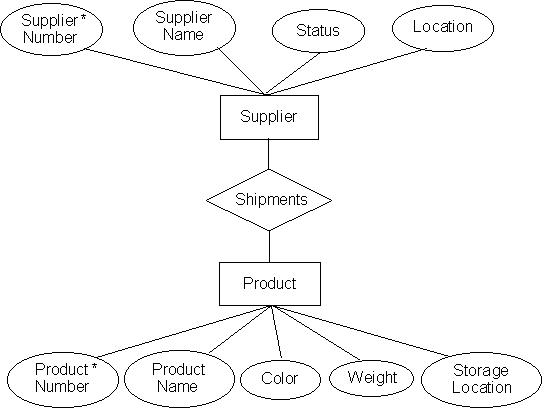
Any organization can be broken down into logical units, or sets, which represent meaningful entities by themselves. There are different aspects, or attributes, which describe each member of this set. The sets are usually related to each other - just as each functional unit of any organization is linked to others, and interacts with them. To arrive at a logical structure of the organization, we need to systematically identify all the entities, and the relations between them. This can be done graphically, by drawing an Entity-Relationships diagram (an E-R diagram).
Consider a simple scenario:
A marketing company gets different products from suppliers and stores them in some warehouses. The products are described by name, color code, weight, and an identifying number. The company keeps track of the suppliers by name, where they are located, and a rating number. The smooth running of the marketing requires keeping track of the shipments of products from the suppliers.
The E-R diagram of this simple example can look like:
Figure 10.1. The E-R diagram for the warehouse database
Note that in the E-R diagram, The blocks represent entities, diamonds represent relationships, and the ellipses represent the attributes. This diagram essentially captures the logical structure of the data that we want to maintain.
The exercise of building up relational databases is now reduced to converting the E-R diagram in a systematic way into tables. The tables, as we shall see, form the basic building block of the database: Every bit of information in the database is stored in tables. Conversion of the E-R diagram to tables is achieved by following two simple steps:
• Make one table for each entity;
• Make one table for each relationship.
The tables for the above example may look, for instance, like the following:
S S# SNAME STATUS LOCATION
S1 Leung 20 LoWu
S2 Wang 10 TaiPo
S3 Kwok 30 TaiPo
S4 Lee 20 LoWu
S5 Su 30 ChoiHung
P P# PNAME COLOR WEIGHT LOCATION
P1 TV Red 12 LoWu
P2 VCR Green 17 TaiPo
P3 Radio Blue 17 LamTin
P4 Radio Red 14 LoWu
P5 HiFi Blue 12 TaiPo
P6 Oven Red 19 LoWu
SP S# P# QTY
S1 P1 300
S1 P2 200
S1 P3 400
S1 P4 200
S1 P5 100
S1 P6 100
S2 P1 300
S2 P2 400
S3 P2 200
S4 P2 200
S4 P4 300
S4 P5 400
The SP table represents shipments. It serves, in a sense, to connect the products to the suppliers. Thus, the first row of the table SP represents the fact that the Supplier whose number in the Table S is S1 supplies 300 units (quantity) of a product, whose number in the P table is P1. We shall assume that at a given time, a given supplier can only have one shipment of a specific part on delivery. Thus in table SP, there is at most one row for a given combination of S# and P#.
What are the restrictions we place on our tables ?
1. The sequence of attributes for any given row is fixed.
Thus, once we decide to keep the data in the file SP in the order S# - P# - QTY, all rows of entries must be stored with the corresponding entries as supplier number - part number - quantity.
2. The order of storage of rows in the file does not matter.
In other words, we are allowed to shuffle the rows within the file, without affecting the information in the database.
3. The type of information for any field is constant over all entries.
Thus, all weight entries in the part table must be of type number, and all entries of location in the supplier table must be of type character string. This also means that all rows and columns of each table must be filled with a value when recording data.
What are the advantages of building a number of records instead of one large table with all the information ?
If we stored all information in one file, we would end up with using a large amount of repetition of information over the records. This arrangement would be inefficient in terms of utilization of computer file space.
Secondly, the break-up of information into small, structured tables organizes the entire database logically, thereby making the entire system more comprehensive.
Data Manipulation
We shall briefly study some of the simple means of data manipulation in relational databases. For this purpose, we shall use a syntax called SQL (Structured Query Language) that was initially developed by IBM, and is perhaps the most popular of all database manipulation syntaxes.
The data manipulation in Microsoft Access™ (that you will use in your lab) is closely related to this, and provides a graphical interface to specify commands (called queries, in DBMS terminology). However, there may be some small differences in syntax and the output behavior that you may encounter.
In these examples, we shall follow the following format: first we shall describe the query in simple English; then we shall construct the SQL equivalent of this query; and finally we shall display the output of a DBMS system that would process our SQL query (by the way, SQL is commonly pronounced as sequel).
For all of our work, we shall use the supplier-product database.
• Get the supplier number and status for suppliers in TaiPo.
SELECT S#, STATUS
FROM S
WHERE LOCATION = 'TaiPo'
result:
S# STATUS
S2 10
S3 30
Note that the statement has three distinct parts: The SELECT part describes which particular attribute we are interested in displaying; the FROM part specifies which table has the information we are looking for; and the WHERE part constraints the display to only those records that we are interested in. Thus, both SELECT and WHERE are screening out some information we are not interested in, and this screening is shown pictorially in fig 12.2.
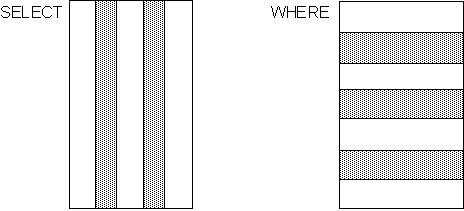
Figure 12.2. The restrictions implied by SELECT and WHERE
• The results can also be displayed in an ordered fashion.
SELECT S#, STATUS
FROM S
WHERE LOCATION = 'TaiPo'
ORDER BY STATUS DESC
result:
S# STATUS
S3 30
S2 10
One of the most powerful tools of relational systems is the ability to relate two or more tables by an operation called a join in order to obtain parts of information from each of the tables.
• Get information of all co-located parts and suppliers.
SELECT S.*, P#, PNAME, P.LOCATION
FROM S, P
WHERE S.LOCATION = P.LOCATION
result:
S# SNAME STATUS S.LOCATION P# PNAME P.LOCATION
S1 Leung 20 LoWu P1 TV LoWu
S1 Leung 20 LoWu P4 Radio LoWu
S1 Leung 20 LoWu P6 Oven LoWu
S2 Wang 10 TaiPo P2 VCR TaiPo
S2 Wang 10 TaiPo P5 HiFi TaiPo
S3 Kwok 30 TaiPo P2 VCR TaiPo
S3 Kwok 30 TaiPo P5 HiFi TaiPo
S4 Su 20 LoWu P1 TV LoWu
S4 Su 20 LoWu P4 Radio LoWu
S4 Su 20 LoWu P6 Oven LoWu
In the example we meet a few new aspects of the syntax:
The first is the wildcard specifier, *, in the select.
The second is the identification of attributes in different tables with the same name, by means of suffixing the name with the table name, separated by a dot.
And of course, the mechanism of the functioning of the join. The method is simple: take all pairwise combinations of records from each of the tables, reject any pair which doesn't satisfy the condition specified in the WHERE, and display the attributes specified if it does.
Till now, we have seen only very simple cases of the WHERE clause. To get more interesting information from a database, we often need to specify many more constraints. The real power of data retrieval comes from the diverse restrictions one can place on a search using the many features of this clause. We shall see some of the more interesting ones in the following examples.
• Get information of all co-located products and suppliers, such that the supplier status is not 20.
SELECT S.*, P#, PNAME, P.LOCATION
FROM S, P
WHERE S.LOCATION = P.LOCATION
AND S.STATUS ~= 20
result:
S# SNAME STATUS S.LOCATION P# PNAME P.LOCATION
S2 Wang 10 TaiPo P2 VCR TaiPo
S2 Wang 10 TaiPo P5 HiFi TaiPo
S3 Kwok 30 TaiPo P2 VCR TaiPo
S3 Kwok 30 TaiPo P5 HiFi TaiPo
• Get names of suppliers who supply product P2.
SELECT SNAME
FROM S
WHERE S# IN
( SELECT S#
FROM SP
WHERE P# = 'P2' )
result:
SNAME
Leung
Wang
Kwok
Lee
Which was a simple example to demonstrate that queries can be nested. The common method of linking nested queries to get all records is by the use of the operator IN. Of course, any other operator would work. Nesting can be done to any level.
• Get supplier names for suppliers who supply at least one red-coded product.
SELECT SNAME
FROM S
WHERE S# IN
( SELECT S#
FROM SP
WHERE P# IN
( SELECT P#
FROM P
WHERE COLOR = 'Red') )
result:
SNAME
Leung
Wang
Lee
Another powerful construct allowed in the WHERE clauses is the EXISTS operator:
• Get supplier names for suppliers who supply product P2.
SELECT SNAME
FROM S
WHERE EXISTS
( SELECT *
FROM SP
WHERE SP.S# = S.S#
AND SP.P# = 'P2' )
result:
SNAME
Leung
Wang
Kwok
Lee
The EXISTS here represents the Existential Quantifier that you know about, from calculus. Some things to notice:
1) In the EXISTS ( SELECT * ...etc..) clause, there is a reference to an attribute S.S# outside the (SELECT * FROM SP .. ) clause.
2) The expression EXISTS (SELECT * ..) evaluates to true if and only if the result of evaluating the (SELECT * ..) is not empty.
Some very powerful queries can be constructed using EXISTS, and its logical negation, NOT EXISTS. Try to understand how each of the example queries using these work (by checking each value from the tables).
• Get supplier names who do not supply P2.
SELECT SNAME
FROM S
WHERE NOT EXISTS
( SELECT *
FROM SP
WHERE SP.S# = S.S#
AND P# = 'P2' )
result:
SNAME
Su
• Get names of suppliers who supply all the products.
SELECT SNAME
FROM S
WHERE NOT EXISTS
( SELECT *
FROM P
WHERE NOT EXISTS
( SELECT *
FROM SP
WHERE SP.S# = S.S#
AND SP.P# = P.P# ))
result:
SNAME
Leung
In fact, the query is constructed more easily in this case, if we paraphrase the question to its equivalent form: select supplier names such that there exists no product that they do not supply.
The name SQL is not entirely correct, since SQL also provides the syntax to create and update tables. Up till now, we have seen how data retrieval works. The next three example show how tables are updated.
UPDATE P
SET COLOR = 'Yellow',
WEIGHT = WEIGHT + 5,
WHERE P# = 'P2'
DELETE
FROM S
WHERE S# = 'S1'
INSERT
INTO SP ( S#, P#, QTY)
VALUES ( 'S4', 'P3', 200 )
DELETE and INSERT delete/create entire records in a table. UPDATE changes the specified values of attributes. Most mathematical operators are allowed in UPDATE, and the WHERE clause can be as complicated as for SELECT.
Most table creation, and some updating in ACCESS™ is done visually - which is much simpler for small amounts of data. The advantage of using a format like SQL is that it is easier to keep track of all changes made by maintaining a log of queries/updates/inserts. This way, if there is some wrong data (mis-typed, or corrupted in the computer), the source can be tracked easily, and correction is simple. Details of SQL and its use can be obtained from the databases textbook in the references, by C. J. Date.
S
S# SNAME STATUS LOCATION
S1 Leung 20 LoWu
S2 Wang 10 TaiPo
S3 Kwok 30 TaiPo
S4 Lee 20 LoWu
S5 Su 30 ChoiHung
P
P# PNAME COLOR WEIGHT LOCATION
P1 TV Red 12 LoWu
P2 VCR Green 17 TaiPo
P3 Radio Blue 17 LamTin
P4 Radio Red 14 LoWu
P5 HiFi Blue 12 TaiPo
P6 Oven Red 19 LoWu
SP
S# P# QTY
S1 P1 300
S1 P2 200
S1 P3 400
S1 P4 200
S1 P5 100
S1 P6 100
S2 P1 300
S2 P2 400
S3 P2 200
S4 P2 200
S4 P4 300
S4 P5 400