Programmable Logic Controllers
[Note: these are new notes; please comment on the contents so that I can improve them further ! ]
To begin with, what does a PLC look like ?
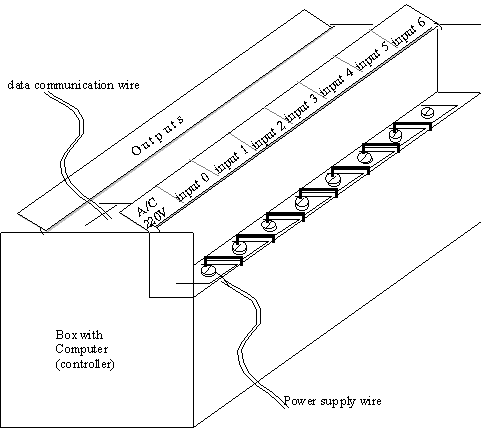
It looks like a box, with many little electrical connecting points along its sides. The following schematic sketch demonstrates a simple PLC.
Figure 1. Schematic sketch of a simple PLC
Some more complex PLC’s look a little different, but EVERY PLC will have the following components:
1. A set of electrical connections corresponding to INPUTS. Each connection has a unique INPUT number.
2. A set of electrical connections, corresponding to OUTPUTS. Each connection has a unique OUTPUT number.
3. A Controller, which is a simple form of a computer.
What can a PLC do ?
Execute logic to control equipment based on some conditions which are reported by sensors, or switches. This needs some explanation. Consider that there is some equipment in a factory which needs to be controlled by some actuators. For example, when a part is loaded on a machine, we would like two pneumatic cylinders to extend and hold the part into a fixed position. Then we would like to turn on a motor, which operates a drill to make holes in the part. When the drilling is done, we would like to switch off the drill, and then release the cylinders, to remove the part.
Imagine that when a part is put on the machine table, a photo-sensor is activated, giving us an indication that the operation sequence described above must begin.
Then we can use a PLC to operate all this machinery.
First, the photosensor gives the signal of part arrival: it is therefore an input to our logic, indicating that operations must begin. Such sensors are usually connected to the INPUT connections on the PLC (since these sensors are external to the PLC, they are also called EXTERNAL INPUTS).
The logical sequence of operations: Turn Cylinder 1 ON -> Turn Cylinder 2 ON -> Turn Drill Motor ON -> Wait (delay) till Drilling is done -> Turn Drill Motor OFF -> Turn Cylinder 2 OFF -> Turn Cylinder 1 OFF must now be executed. All this is information is very systematic, and therefore we can program it into a computer to perform the operation. This information is then EXECUTED (just like a computer RUNNING a PROGRAM) by the computer inside the PLC. This computer is called a CONTROLLER (since it controls the logic).
Thus, when the EXTERNAL INPUT connected to the Photo Sensor is turned ON, the PLC controller senses that actions must begin, and it first turns a SPECIFIED OUTPUT terminal (for example, Output 1), ON. This means that at the electrical connection corresponding to Output 1, the voltage level, which was 0volts before, is now turned HIGH (example, 24 Volts). Of course, we had connected this Output 1 connection with a wire to a solenoid valve controlling the Cylinder 1. Thus Cylinder 1 will now turn ON.
Again, since the terminal Output 1 is connected to a device (in this case, a solenoid) outside the PLC, we call it an EXTERNAL OUTPUT terminal.
Similarly, we had connected (external) Output 2 to a solenoid controlling Cylinder 2. And Output 3 to the motor driving the Drilling Machine. Thus, CONTROLLER, in sequence specified by the LOGIC PROGRAMMED by you, controls the External Outputs to go ON and OFF. And accordingly, the different actuators connected to the External Outputs are turned ON and OFF.
Can the PLC control many different actuators ? Yes ! It can control as many actuators as it has External Output terminals.
What kind of logical sequences of operations (including repeating actions, or loops) can the PLC control ? Many, and we will now learn these.
Example 1:
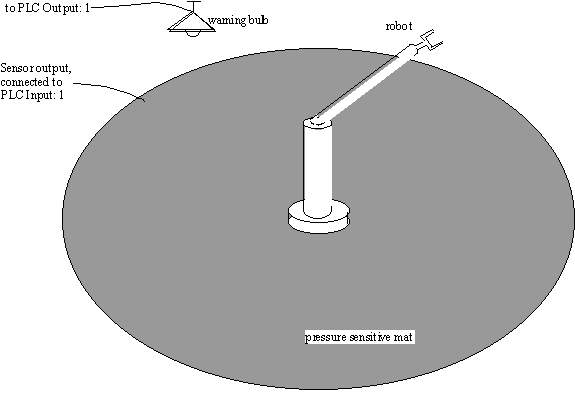
Let’s start with the simplest example. In our factory is a robot, which picks up heavy metal parts from one place, and puts them in another place. When the robot is working, it is not safe for humans to go near it, since there could be an accident. Therefore, to warn the human operator that they are too close to the operating robot, we need to install a warning light.
On the floor close to the Robot’s operational area, we put a pressure sensitive mat. This mat has a pressure sensor, so when the load on top of it is increased (for example, when a human steps on the mat) then the pressure switch is activated and turns ON.
THE LOGIC:
When Pressure_Switch is ON, turn the Warning_Light ON.
(of course, when the pressure switch turns off again, that is, when the human goes away from the robot, the warning light must also go off.)
STEP 1:
We write this logic into a PROGRAM (since the computer can only understand programs!).
STEP 2:
We load this program into the PLC.
STEP 3:
We connect the sensor output (in this case, the Output of the Pressure sensitive switch) to the External Input terminal. Of course, we have more than one External Input terminals. Which one do we connect ? The one we specified in our program !
STEP 4:
We connect the PLC External Output Terminal (specified by our program) to the Warning Light.
STEP 5:
Now, we EXECUTE the logic program on the PLC.
Physically, this configuration is as follows:
Earlier, we said that we can PROGRAM the PLC to execute the logic. How do we do that ? By using a programming language called LADDER LOGIC.
Ladder logic is a very simple programming language. Every programming language (example, Pascal, C, C++) has a syntax, or grammar, to write programs. Programs are a sequence of instructions. Similarly, Ladder logic programs are a sequence of instructions. However, there are two important differences:
1. Other programming languages usually require programming using text. On the other hand, ladder logic is a picture-based language. All symbols in ladder logic are simple pictures.
2. In most programming languages, the instructions that make up a typical program are executed in sequence (one after the other), until a specific statement, e.g. HALT, or EXIT is encountered, telling the program to stop. In Ladder logic, there is no HALT instruction -- the program runs until you physically terminate it. Also, every instruction in the ladder logic program is executed in PARALLEL (that is, at the same time). After executing all the statements, they are executed again (in parallel, as before), and so on.... until the program is halted by an external command.
There is a third difference: Ladder logic is much simpler than most other programming languages. Every symbol in the syntax has a direct correspondence either to simple electrical switches, or to electronic switches like timers or counters.
Shown below is the ladder logic program for the Robot warning light:
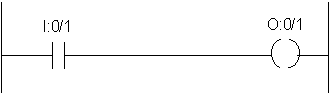
The program has five parts:
1. A Left vertical line
2. A Right vertical line
3. One horizontal line, with two symbols:
4. The symbol -| |- which signifies a switch, called I:0/1
5. The symbol -( )- which signifies the output relay, called O:0/1
Every ladder program has a single left-side vertical line, which we will interpret as an electrical line which is connected to HIGH voltage.
Every ladder logic program has a right-side vertical line, which we will interpret as an electrical line that is connected to GROUND (zero volts).
Each horizontal line in the program represents one instruction. In simple terms, the instruction can be thought of as an "IF (condition(s)) THEN (action)" statement. In our program, there is only one instruction:
IF (input switch I:0/1 is ON) THEN (output relay O:0/1 is ON).
Let’s look at the --| |-- symbol some more. Technically, it represents a switch, and is called an "EXAMINE IF ON’ instruction. Another name for it is "NORMALLY OPEN" switch.
Imagine that it is indeed a switch, then the left side is directly connected to the left vertical line, and is therefore at HIGH voltage. When the switch is OFF, the right side of this switch will be a ZERO voltage.
Similarly, the --( )-- symbol represents an OUTPUT RELAY (or a COIL). From your high school physics, you know that a relay is usually made up of a coil of conducting wire, and is quite similar to a solenoid in structure.
There are two things to understand about the --( )-- symbols.
First, when the --| |-- switch is OFF, the voltage across the coil is ZERO, and so the OUTPUT Relay is OFF. But when the --| |-- switch is ON, then the two terminals of the switch are electrically connected, which means that the right side of the --| |-- switch is at HIGH voltage, and therefore the voltage across the COIL is HIGH. This means that the COIL is turned ON.
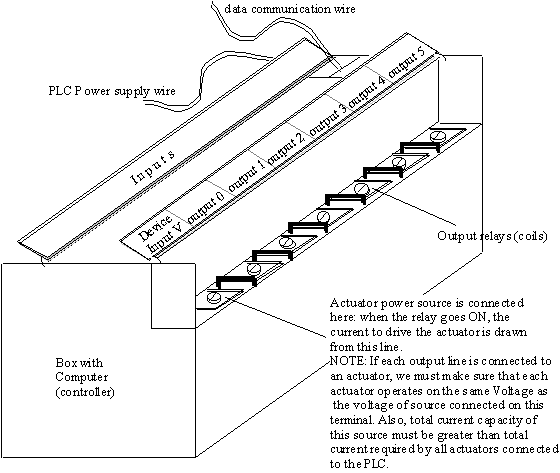
Second, why is the output a COIL ? After all, if we are going to use this connection to turn ON (or OFF) an actuator, we could just use a switch ! The reason is that a typical PLC can control many different actuators. Typical actuators on a shop floor may include Machine tools, Conveyors, Robots etc. Each of these equipment require high power, which means a lot of current to operate. If we use a switch to directly turn on such a high power line, the connections will burn out very easily (due to sparking during switching). Also, the single power supply line to the PLC may not be able to supply such a large amount of current. Thus, the output is a relay, which can then be used to switch on a high power line, to operate the machinery.
We now see how the single line of PROGRAMMED LOGIC works: If the INPUT SWITCH called I:0/1 is turned ON, then the Output Coil called O:0/1 is turned ON. If this coil is connected to the Warning Light, then our PLC will work as required in example 1.
We finally take a look at the OUTPUT side of the PLC to understand these connections.
Example 2. Normally Closed Switches
The program above works well for our example. But what happens if the pressure mat output is a Normally Closed switch ?
Recall that a normally closed switch, (just like the proximity switch in your lab) will be ON when it is NOT ACTIVATED. That is, when there is no pressure on the mat, the switch output is HIGH voltage.
In this case, if we directly connect the switch to our PLC as before, then the program does not work properly: when there is no pressure on the mat, the warning light will be ON ! To allow for such types of switches, Ladder Logic provides a symbol for normally closed switches as well. Using this, we modify our program, and the new program looks as below:
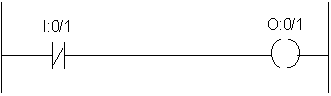
Notice two things:
1. The physical connection of the pressure mat switch output wire is still at the same terminal on the PLC, and so has the same name, I:0/1.
2. The symbol for the NORMALLY CLOSED (NC) switch (also called an EXAMINE IF OFF instruction) is --|/|-- where the diagonal line going between the two vertical bars
Let’s look at how this circuit works:
Under normal conditions, when no person has stepped on the mat, the output of the pressure mat is HIGH voltage (NC). So the terminal I:0/1 sees a high voltage, and activates the input switch I:0/1 in the ladder program. Therefore, the right side of the Input switch is at ZERO voltage and the Output coil is OFF. Therefore, the Warning light is OFF.
When you step on the pressure mat, the switch is activated, and so the mat output wire is at ZERO voltage. Thus, I:0/1 sees a ZERO voltage, and since it is NC, the switch terminals are conducting. Therefore, the Output coil O:0/1 will be subjected to HIGH voltage, and the warning light is turned ON.
Example 3. Complex Logical Conditions.
The Ladder program can have more than one line. Also, the logic on each line (the "IF (conditions)" part) can be much more complex than shown in example 1.
We want to enhance the safety of the work area. Therefore, we install two separate pressure mats around the robot. The outer mat is the warning only area. If this mat is activated, the warning light goes ON. The inner mat covers the area within the reach of the robot. If this mat is activated, the warning is ON, and also, the Robot is switched off automatically. After stepping away from this mat, the person has to manually switch the robot back ON. The figure below shows the configuration:
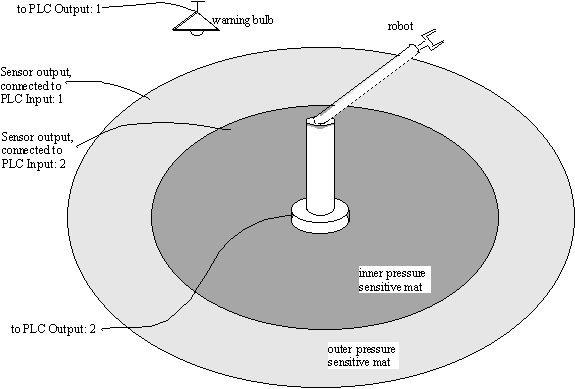
Let us see how to construct the ladder logic program for this situation.
We now have two different actuators to control: the robot, and the light. First consider the warning light:
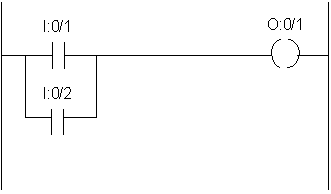
Notice how the outputs of both the pressure mats have been connected IN PARALLEL, so that if either of the two mats is activated, the warning light will be ON. This type of a connection is called a BRANCH. Branches are used when you need to implement ‘OR’ logic in Ladder Logic Programs. Above, the logic was: IF (I:0/1 OR I:0/2) THEN (O:0/1).
The connections for the Robot are more tricky. Our first try could be:
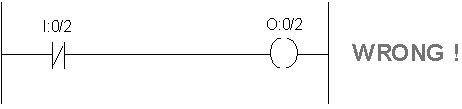
This does not work ! When the inner mat is de-activated (output = ZERO volts), the Robot is turned ON, since I:0/2 is Normally closed.
When somebody steps on the inner mat, I:0/2 is switched to ZERO volts, and so the robot switches OFF.
HOWEVER: soon as the person steps off the mat, the robot will get activated again, even before we can use a manual reset switch to turn on the robot.
Therefore we need some other solution. We will solve this problem by breaking it into simpler parts: First, let’s find a way so that once the inner mat is activated, the robot remains off, even if the mat gets de-activated.
This is done using a configuration called a ‘latch’:
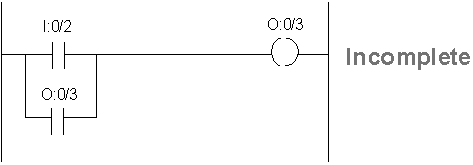
Note:
1. To create the latch, we use an extra output coil, called O:0/3. When the pressure mat connected to I:0/2 is activated, O:0/3 is turned ON. Notice how the parallel ‘OR’ line refers to the SAME output as a SWITCH ! Thus, when O:0/3 is turned ON, this switch is also turned ON. Now, even if I:0/2 is OFF, O:0/3 remains ON, since it is using itself to stay ON ! This is a very common configuration, called a latch.
Now we can use this new switch O:0/3 to control the Robot:
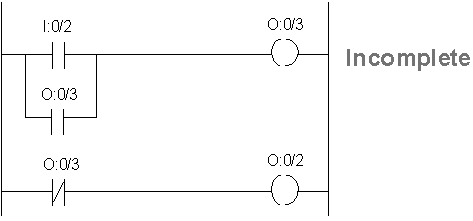
Thus, soon as the inner mat is switched, it latches O:0/3, which in turn switches the Robot OFF (from the second line of the ladder program).
This solution is OK, except: what do we do when we want to turn the Robot back ON ? Logically, we must be able to switch O:0/3 to ZERO volts, so as to turn the robot ON. Doing this is now easy:
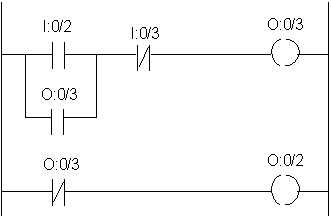
Notice how pressing I:0/3 (which is a push-button switch to reset the Robot, connected to Input line I:0/3), causes output coil O:0/3 to switch off (first row of program). This in turn causes the Robot to be switched ON (row 2 of program).
We are now almost done, except for one last detail: What if one person accidentally stepped on the inner mat, and is still standing there, but another operator press the Reset button ? This would still cause the Robot to start -- but is not safe ! So we will ensure that the Robot only operates when the inner mat switch is OFF. Doing this is also easy, and the final program for the entire example looks like this:
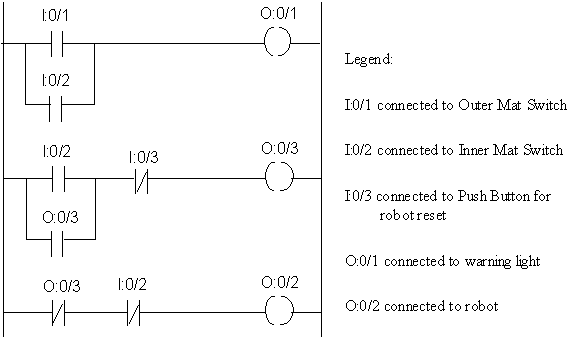
Switch Naming Conventions:
You may have noticed that we are using a system for giving names to the different switches and coils that we connect wires to. All Inputs to our logic (which are usually the outputs of sensors, or manual push-buttons) are connected on the INPUT side of the PLC. The Input terminals have specific names, to identify which sensor is connected at which terminal. Our naming convention follows the system used for Allen-Bradley PLC family. Every PLC manufacturer has their own naming convention. For Allen-Bradley products, the first character indicates the type of instruction:
‘I’ indicates an external Input terminal
‘O’ indicates and external Output terminal.
The number directly after the ‘:’ indicates which "slot" of the PLC the particular switch is connected on. For small controllers, all Inputs and Outputs are located on the same "slot", called slot-0. On larger PLC’s, there may be many "slots" where Input or Output terminals can be attached. Each slot has a given identification number, which can be used to identify the switch location.
The number after the ‘/’ indicates the terminal number where the particular Input or Output wire is connected. For each slot, the terminal numbers are fixed, and printed on the PLC. Typically, one Input or Output slot can have between 10 to 20 terminals. If you need to control a very large factory system, with hundreds of sensors and many actuators, you will need a large PLC with many extra ‘slots’.
More on Example 3: Internal Switches
As shown above, the example 3 above will work. However, we can still improve it. Notice that the Output terminal number 3, ):0/3, is used by our program. However, that particular terminal point of the PLC is not connected to any actuator. In effect, we are only using this Output as an "internal variable" in our program: it is not an EXTERNAL OUTPUT. Imagine if our PLC has 6 output terminals. If we keep using External output terminals as ‘internal variables’ in our programs, we cannot use these terminals for controlling actuators directly. To avoid using External outputs as internal variables, all PLC’s allow you to use INTERNAL SWITCHES. An internal switch is just the same as an output relay -- except that it is not associated with any External terminal. In Allen-Bradley hardware, such internal switches are given names starting with the letter ‘B’, followed by an integer.
We can therefore further improve our program as follows:
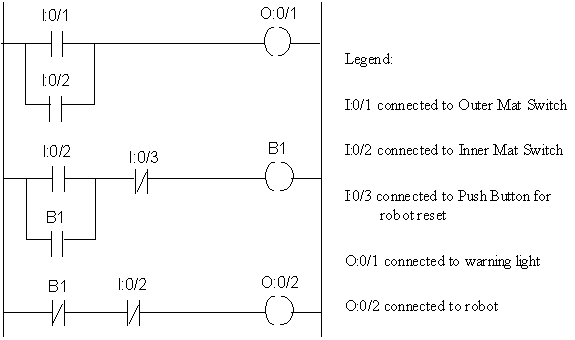
This program will work the same as the earlier one, except now the terminal O:0/3 is free to be used for controlling another actuator.
Example 4. XOR switch
Following is a simple example of how to implement an XOR switch using Ladder Logic. Recall that A XOR B, for two independent switches ‘A’ and ‘B’, is ON when exactly one of the switches is ON (IF (A is ON AND B is OFF) OR (A is OFF AND B is ON). This is easily translated into a ladder logic program:
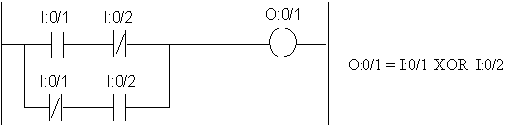
Exercise:
Try all combinations of values for I:0/1 and I:0/2 and check the solution.
Example 5. Doing more with PLC’s: Timers
Another thing we’d like to do is time delays, and timed control of equipment. This is very useful for many control situations. Common examples of automatic controls with time delays include door lock switches (like the number lock for the Industrial Automation Lab door), Elevator doors (which close after a fixed period of staying open) etc.
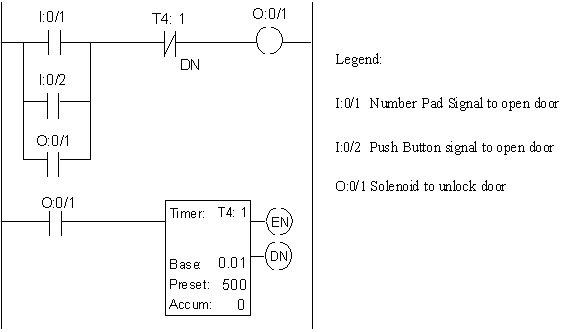
Let’s write a ladder logic program to control a card operated door lock. The lock is disengaged (unlocked) by switching ON a solenoid. The solenoid is activated using two switches: (a) from outside the room door, the signal to activate the solenoid comes from the Number-Pad, if the correct sequence of code numbers is pressed; (b) From inside the room door, there is just a simple push button, which can be used to disengage the lock. Upon activation, the door stays unlocked for 5 seconds, and then locks again.
There are two components in the ladder logic program for this example: First, when a ‘open door’ signal is received, it must be latched (so that the door stays unlocked even if the push button is released). Second, a timer instruction in the ladder logic is used to release the latch after the specified time (5 seconds). A typical timer instruction, as used below, is called TIMER ON DELAY.
The ladder logic program is shown below:
Notes:
Row 1. If either the number pad unit, or the push button activate the door open signal, then output O:0/1 is turned ON. Also, the left side switch O:0/1 latches to this output, so even if the push button is released, O:0/1 will stay ON.
Row 2. This is the row with the timer instruction. To program the timer, four things must be input:
• Name of the timer (in the example, T4: 1). Every timer in a program must have a unique name. For Allen Bradley programs, all timers must have a name given by T4: [number], where [number] can be any non-negative integer, such as 0, 1, 2, 3, 4....
• Time Base: (in the example, 0.01 sec). This shows the time duration after which the timer updates the accumulated delay value.
• Preset: This is the number of time base increments after which the timer will switch ON. In our case, we need a delay of 5 secs, so it’s value is 5/(time base) = 5/0.01 = 500 steps.
• Accumulated: This is the number of time increments that have currently elapsed. When the accumulated value equals or exceeds the Preset value, a switch called the T4: 1 / DN switch turns ON. Notice the name of the switch is the same as the Timer, with extension /DN (which is a short form for DONE).
The timer will keep counting up time when the left side (IF (conditions) of the timer row are ON. In our example, when O:0/1 is ON, the timer starts counting, in steps of 1.0 sec (since base = 1.0 sec) time. After 5.0 seconds, Preset is equal to Accumulated value, and the T4: 1/ DN switch turns ON.
This causes the Output O:0/1 to turn OFF ( from row 1), and the door locks again.
Example 6: More on Timers
Let us now extend the timer example with two more features.
(a) When the door is unlocked, we would also like to have an indicator light to turn ON, to give us a visual input.
(b) While the door is unlocked, if someone again activates the push button, then the door should stay unlocked for 5 seconds starting from the new activation time of the push button.
The solution to these extensions is quite simple. For case (a), we notice that the switch O:0/1 is ON if and only if the door is unlocked. Therefore, we can use this to turn on a light also.
The second requirement uses another feature of the TIMER instruction on Ladder Logic Programs: this is called the Timer RESET. When a particular timer switch is reset, it’s Accumulated value is set to ZERO. Therefore, using a timer T4: 1 RESET will do what we want. Of course, we would like to use I:0/2 to reset our timer (why ?).
The final solution is as follows:
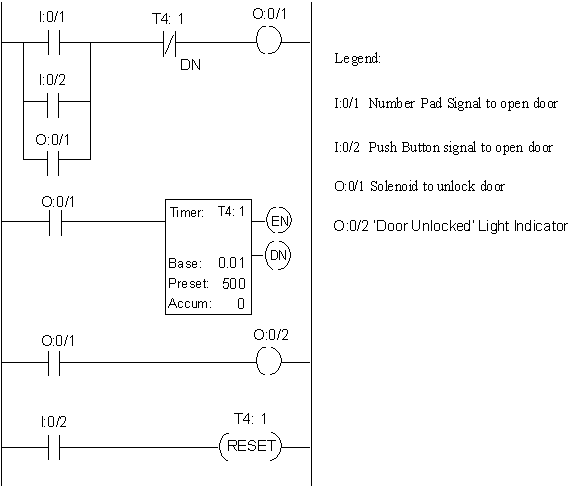
In the example, please note that the first two rows are exactly the same as for example 5. The third row makes the indicator light to go ON when the door is unlocked. The final row shows the logic to reset the timer. Note how the TIMER RESET instruction is programmed.
Example 7. Counters
Finally, we introduce another useful feature of PLC’s, namely, COUNTERS. A counter is a device which can be used to count the number times an EVENT happens. The word ‘EVENT’ in this definition commonly means the following: if input switch turns ON from an OFF state that is, if it was OFF, and then turned ON, then the event has happened one time. Thus if a switch goes: OFF -> ON -> OFF -> ON, then exactly two event are said to have occurred. In other words, the counter counts the number of times the IF (conditions) part of the instruction goes from false (OFF) to true (ON).
First, let us consider a simple example. In a factory, parts arrive at a workstation, one by one, on a conveyor. A photoswitch is used to detect arriving parts. After 4 parts have arrived, the conveyor is stopped and a light indicator switches ON. The operator then loads the arrived parts into the machine tool, and restarts the conveyor for the next batch of parts to arrive. The following ladder program can be used to provide the control for this problem.
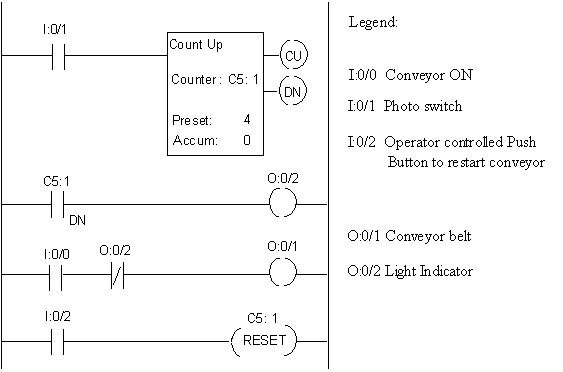
Notice how the COUNTER is programmed. The COUNTER INSTRUCTION requires you to specify the following things:
1. Whether the counter will count UP (that is, 1..2..3..4...etc.) or DOWN (as in 4..3..2..1..0).
2. The unique name of the counter. In case of Allen Bradley PLC’s, the names assigned to counters are in the following format: C5: <number>, where <number> is a non-negative integer.
3. The preset value, which is usually the number of EVENTS after which you need the counter to give you a signal (output).
4. The current accumulated value. Each time the counter IF (conditions) goes from false to true, the accumulated value is increased by 1. In our example, each time the switch I:0/1 goes ON, the counter accumulated value increases.
Once the accumulated value is equal to or larger than the preset value, a switch is turned ON: this is the COUNTER DONE switch; in our example, this is the C5: 1/DN switch.
Also note that the DONE switch is turned OFF when the counter is RESET (as by row 4 of the program).
Example 8. Car Wash
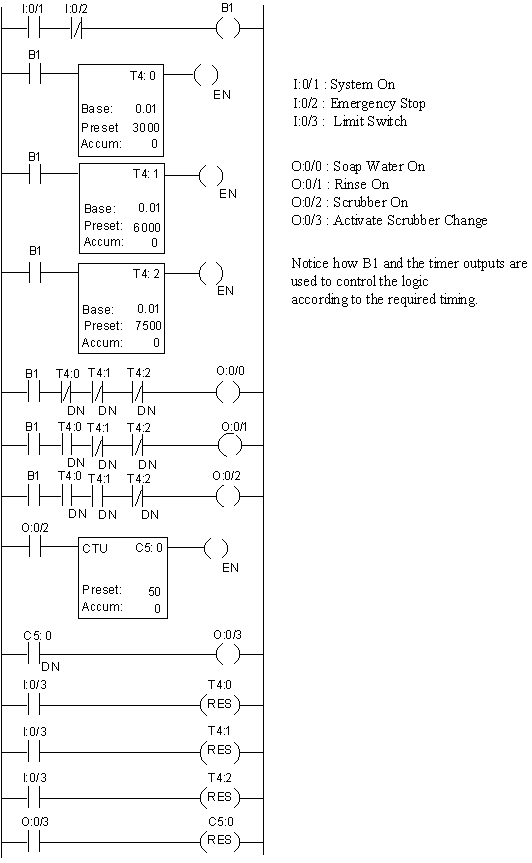
In an automatic car wash, when a car drives into the wash-area, a limit switch turns the washer on. The washing is in tree subsequent phases: First, soapy water is sprayed on the car for 30 secs; Next, the car is rinsed with a spray from the clean water pipes; Finally, automatic scrubber brushes dry the car for 15 secs. After washing 50 cars, the scrubber brushes are changed automatically. The entire operation is controlled using a PLC. A ladder logic that can be used to control this activity is as follows:
Programming a PLC
Now we know how to write Ladder Logic programs to control automation devices. We also know how to connect the external Inputs and Outputs (I/O’s) to the sensors and actuators. But how do we input our ladder logic program into the PLC computer ? There are two ways to do so:
Hand Held Console: this is a special device which can be connected to a PLC. It has special buttons on a small keyboard, which represent different types of ladder logic instructions. It allows you to enter a ladder logic program, instruction by instruction, and row by row, straightaway into the PLC. It also has special buttons on its keyboard to execute your ladder logic program, once the program has been stored inside the PLC.
PC interface program: The other, and better way to enter the ladder logic program into the PLC is to first use a software program to write the ladder logic program on a Computer (PC). Once the program has been written, and tested (debugged), it can be used on the PLC. Of course, to write a ladder logic program in a PC, we need to use special software. In our case, we use a special program, called ‘APS’ (which stands for ‘Advanced Programming System’) to write ladder logic programs in the PC. This program is specialised to be used for Allen Bradley PLC’s (which you use in your lab). In industry, you may work with PLC’s manufactured by other companies -- in that case, the other company will provide you with a different software program to write your ladder logic programs. In fact, even the instruction specifications for different types of PLC’s may differ a little; however, the basic ideas used by any ladder logic programming language are always the same: they are all based on Relay logic circuits, and all provide you with counters and timers.
Now that we understand how to write ladder logic programs to control I/O based discrete event situations in automation, lets get some more understanding of what is really happening inside a PLC when it executes the ladder logic program.
The architecture and functioning of the PLC
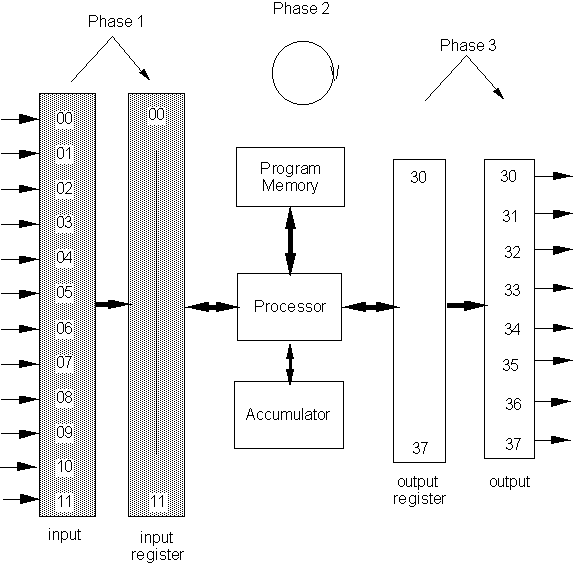
The figure below shows a view of the architecture as well as functioning of a simple PLC. As indicated, the PLC is organized internally into three basic parts.
The first part is the data tables. The data tables are divided into two parts: the input table, and the output table. Each table has a column of names of each of the input/output switches used in the ladder logic program that is to be executed. The names are associated with the memory location where the value of the state of the switch is stored (the registers).
The second part is the user program. The program is stored in a separate area of the PLC memory, and the ladder logic evaluation at each step is performed by consulting the program.
The third part of the PLC is the processor itself. The processor looks at the value of each of the inputs, executes the user program, and then updates the value of the output coils according as the results dictate. One cycle of these evaluations and updates is called an operating cycle. Thus the operating cycle is composed of the phases: Input scan, Program scan, Processing cycle, and Output scan.
Although PLC's were extremely popular and industrially successful as intelligent controlling devices in industry, their use is now on the decline. Some of the reasons for this change include:
• Modern microprocessors are becoming more and more powerful/cheap
• Increasing computer literacy of shop-floor personnel
• New demands from controlling devices including data processing, sophisticated logic control etc.
The study of PLC's however, is essential for two reasons: Firstly, the architecture of the PLC is surprisingly close to the structure of simple microprocessors, which are the brains of any computer. Secondly, PLC's are still ubiquitous on the shop-floors of countless industries, and quite successfully being used to control processes. The hardware is cheap; the software (ladder logic) is easy to learn so factory personnel can learn it quickly and inexpensively. Therefore a qualified engineer should be familiar with their structure, functioning and programming.