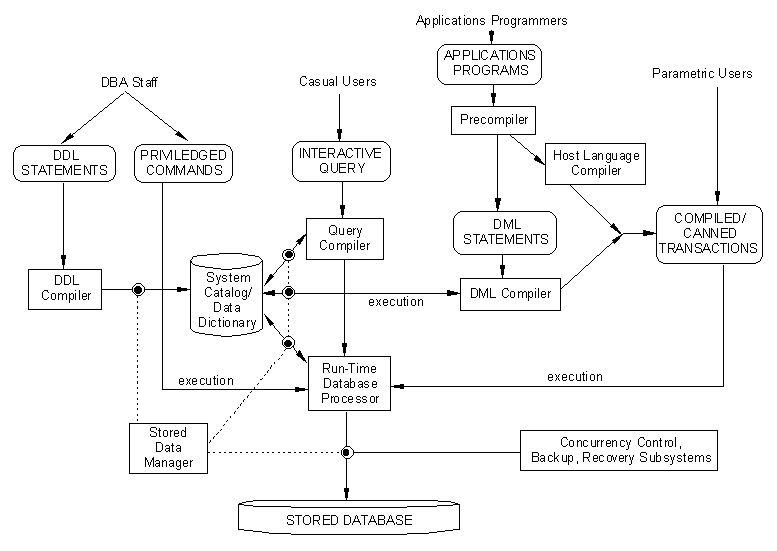
Figure 2.3 (elmasri & navathe)
Lecture 1. Introduction
and Definitions
A Database is a collection of information
about a system. The information is in form of Data (facts that
can be recorded and have a specific meaning with respect to the
system) and procedural or behavioral knowledge.
A computerized Database Management
System (DBMS) is a collection of programs that help in organizing
the information, defining the database, constructing the database
and manipulating its contents.
Why Use a DBMS (Advantages)
?
1. Advantages arising out of use
of a computer
Easy storage of large amounts of
data;
Better protection against data destruction;
Faster Access of information.
2. Restricting Unauthorized Access
Any organized collection of data
has many users, and even more people who may have access to the
storage medium. A DBMS allows different levels of security to
be specified and implemented, to ensure only the authorized person(s)
can read/modify any data stored in it.
Example:
A Database in a bank:
Employee Information:
Phone numbers: accessible to other employees, customers, non-customers
Employee salary: accessible only
to selected employees
Account Information: accessible
to some employees, and to some customers.
3. Controlling Redundancy
Definition: redundant information
refers to the same information being repeated in more than one
storage locations.
Example:
HKUST databases, if ARR and IEEM
dept maintain separate information:
ARR records need to store grades
of each student, their SID, and their Address...
Dept records need to store SID,
student Addresses...
Redundancy is, in general, not good.
Why ?
1. Needs extra storage space.
2. Extra effort in creating and
maintenance of information.
3. Impossible to maintain data consistency.
(e.g. ARR changes student address,
and does not inform department)
NOTE:
Controlled redundancy is, however,
necessary, and useful !
Why ?
1. It may help to recover lost data
in case one data storage is destroyed.
2. It can allow faster access times
for some information.
4. Persistent Storage of Program
Objects (and Data Structures)
In many programming applications,
very large and complex data structures are used to generate information,
which is used to perform some reasoning. Once the program terminates,
all these data structures are lost (removed from the computer
memory), unless they are explicitly stored in flat files. Modern,
Object Oriented Databases allow the direct storage of such data
structures in the DB, for easy and quick retrieval for re-use.
Example:
A factory scheduling software.
5. Providing multiple user interfaces
A well designed DBMS provides for different categories of users (casual users, parametric users, programmers etc.) to access different parts of the DB. This is a big advantage over any other means of storing information.
In some latest DB systems, e.g. Oracle,
such control can be exercised to the level of each data entry
(that is, each data defined by a unique file, record and field).
6. Enforcing Data Integrity Constraints.
In every database, much of the data
must follow some integrity constraints. For instance, the 'date'
field of a record must contain values for `day, month,
year'. This can be easily enforced by a computerized DBMS.
This can be done a several levels:
The `type' of the data entry can be regulated, e.g.
'weight' records must be numbers. Also, the range
of legal values of some fields may be specified to restrict possible
mis-typed entries.
Database systems are commonly classified
using several descriptions: Relational DB, Object Oriented DB,
Hierarchical DB, Distributed DB etc.. Each such description emphasizes
some aspect of the structure (and therefore , storage and
retrieval capability and efficiency) of the DBMS.
The structure of most databases is
described by the use of DATA MODELS.
A Data Model contains:
1. A description of the data types,
their relationships and constraints.
2. Set of basic operations used
to manipulate the data in the DB.
3. The behavior, that is, a set
of user-defined operations allowed on the data (apart from the
basic ones.)
Thus, Data Models reflect the 'design'
of the database, and have no actual DATA. To make this distinction
clear, the term DB Schema is used to refer to Data Models. The
actual data is stored in what are known as DB Instances.
We shall study the ER Model in more
detail later on.
Who cares about the Data Models
?
1. The person who designs a new DB
for a company, must first generate the Data Model, and use this
to generate the DB Instance.
2. Users who write queries to manipulate
the DB should have an idea of the Data Model also. Why ?
(a) So they know what queries can
be made.
(b) So they know how to write the
query ( some queries are more efficient than others).
The architecture of most modern databases
has derived from the THREE SCHEMA Architecture. The three schemas
are the following:
1. The internal schema describes
the physical storage structure of a DB. It describes the details
of how the data is stored on the server, as well as where it is
stored (e.g. details of file paths, of disk partitions etc.)
2. The conceptual schema describes
the structure of the DB to a community of users. It describes
the Entities, their relationships, constraints etc. It is totally
independent of the physical storage level details.
3. The view level schemas, or view
schemas, are a set of different schemas which describe a subset
of the DB for a focused user types. All details of other parts
of the DB are hidden from this schema.
As mentioned before, the designer
of a DB must first build the Data Model. In order to do so, the
architecture of the DB must be defined within the computer. Since
it creates much ambiguity to write such descriptions in high level
languages (e.g. English), several low level languages have been
generated by DBMS vendors to create UNAMBIGUOUS data models.
Each vendor provides their own LANGUAGE
to do this:
For a system strictly following the
3-Schema architecture, the following languages are provided:
SDL: Storage Definition Language
(to specify the internal schema).
VDL: View Definition Language (to
define each of the various views, and their mapping to the conceptual
schema).
DDL: Data Definition Language (to
define the conceptual schema).
Further, each DBMS provides a DML:
Data Manipulation Language, which is used to manipulate the DB
Instances. An example is SQL.
Figure 2.3 (elmasri & navathe)
The above figure gives an excellent
view of the different schemas, different types of users, and the
different components of a complete DBMS. The interactions of the
modules can be understood once we understand each of the individual
terms in the figure.
Legend for fig2_3:
Types of Users
DBA Staff:
This term refers to a set of people
who are involved with the Design, Implementation, and Maintenance
of the DBMS. The staff normally is not involved in either the
'population' of a DB, nor in using the data in the
DB. They are the system administrators, who look after the hardware
and software aspects of maintaining the DBMS.
Casual end users:
These are users who only occasionally
use the DB, but need different data each time. These are users
who write their own queries, to retrieve the required data, typically
using a high level Query Language (e.g. SQL, QBE etc.)
Parametric end users:
These are users who constantly query
or update the data. They may not know how to interact with the
DBMS, except through a set of pre-defined and tested queries,
called canned transactions. Examples of such users
include Bank clerks (tellers), Airline booking agents, etc.
Sophisticated end users:
These are users who thoroughly understand
the DBMS, its facilities, and also the details of the Data Model,
to meet complex requirements. Examples: engineers, scientists
etc.
Component Modules
The actual data of a DB is usually stored on a specified location, in a specified way, on the computer hard disk. Access to this data is via a read/write head, and is totally controlled by the operating system.
However, the DBMS must also control
access to the data in the DB. This is done via a high level function
called the stored data manager.
The Stored Data Manager:
This module controls the access
to all data in a DBMS. This includes all data in the DB, as well
as all data in the catalogs.
Catalog (data dictionary):
The catalog is a systematic storage
of the conceptual schemas of a particular DB. The catalogs therefore
describe the structure of all the data, the constraints that each
entry must satisfy, and also the relations that must hold between
instances of different data entities.
Sometimes, the catalog also contains
'comment' fields, which can be used by new users
to understand the Data Model. (For example, a mechanical engineering
DB may have catalogs specifying what units of measurements are
used for numerical entries in a field called 'part_weight',
or to describe the coding system used to specify numeric 'part_number').
Privileged Commands:
Commands which allow the DB staff
to create accounts for users, for example.
DDL Compiler:
This module processes the schema
definitions specified using the DDL, and converts them into the
appropriate format for the DBMS Catalog. Any interaction with
the DB then refers to the Catalog to verify if it is consistent
with the DDL specifications.
The Run time database processor:
This is the module which accesses
the database at run-time for DB usage (that is, storage of data,
retrieval of data etc.) The access of information on the disk
must, of course, be routed through the stored data manager.
Query Compiler:
High level queries posed by casual
users (entered interactively, for example, through QBE, or FORMS)
must be converted to a compiled form that is processable by the
run-time DB processor. This is done by the query compiler.
Application Programming Related
Application programmers are users who write computer programs that are linked to the DB, totally transparent to the end user (who is usually a naive user). For example, the web page of Gateway 2000 Computer company (http://www.gw2k.com) allows you to select different components for a computer, and then automatically prints out the price of your computer. To do so, it accesses the prices DB of the company, but this is totally of no concern to the client who is accessing that URL.
The application programs may sometimes
be written in a low-level programming language (e.g. C, C++, Pascal).
The program must eventually get the user specifications, convert
them to the appropriate Query in the DML, send this Query to the
DBMS, receive the Query response, and parse it to return the correct,
formatted answer to the user.
Part of the above task is done by
the low level language, and part by the DBMS. Usually, the linking
of the two languages (DML, C++, say) is done by compiling the
C++ program, and linking it to the DBMS compiled 'libraries'
(*.o files on unix, or .DLL files on Windows machines.)
The generation of the final program
is therefore as follows: The precompiler extracts
the DML statements from the applications program; these are compiled
by the DML compiler into object code; the remaining interactive
program is compiled by the C++ compiler (called the host
language compiler) Now the entire program is linked together
to form the application program, or the canned transaction.