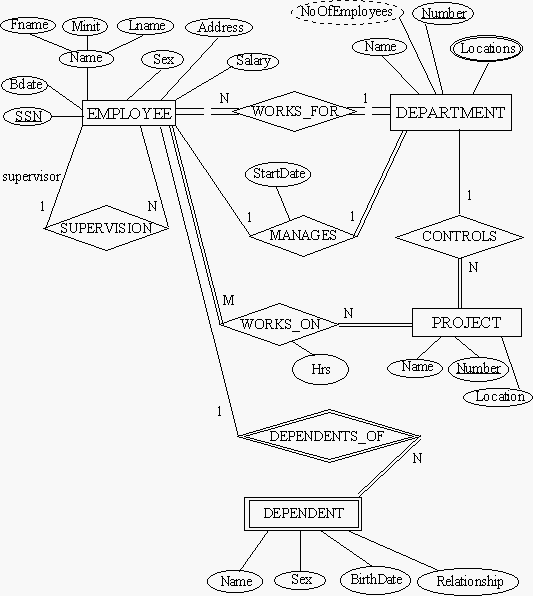
From the last two labs, you all know how to create tables in Sybase. In this lab, we shall do two important exercises, using the information from the previous labs. The first is to build a complete Database. We shall use the same example as the Lecture: The Employee-Department-Projects Database. Here is the ER Diagram for this DB.
insert into [TABLE]
values ("....ADD VALUES HERE")
go
command.
NOTE: All data insertion MUST be done through script files. It may be better if you have ONE script file for each table. In this file, you will need to put in as many insert commands as the number of rows of data.
You may use the data given to you in the lecture notes, or you may make up your own data.
Consider the case where you need to create tables according ot the following
schemas:
A( a1, a2, a3), foreign key a2 refers to B(b1)
B( b1, b2, b3), foreign key b2 refers to A(a1)
Problem 1
To create table A, you need a referential constraint to table B; but to create table B, you need a referential constraint to table A. You may handle this problem by first defining table A without specifying the referential constraint to table B. Then you can create Table B. Finally, you can add the remaining constraint on table A by using the ALTER TABLE ocmmand of SQL as follows:
alter table A add constriant YOUR_CONSTRAINT_NAME foreign key (a2) references
B(b1)
go
Thus, the sequence of operations is as follows:
One way to solve this problem is to allow the attribute a2 of table A to have NULL values. Then, the following sequence of operations will work:
update A set a2="XYZ" where a1 = "a11"
go
Notes: Here, in every row where the a1 value is equal to "a11", the value of a2 column is set to "XYZ". Of course, "XYZ" must be one of the values of column B( b1) to satisfy the foreign key constraint !
Search for "Transact-SQL User's Guide -- the search results will have
an item leading to the user's guide page.