Lecture 9. DBMS File Organization, Indexes
Databases are used to store information. The principle operations we need to perform, therefore, are those relating to
(a) Creation of data,
(b) Changing some information, or
(c) Deleting some information which we are sure is no longer useful or valid.
We have seen that in terms of the logical operations to be performed on the data, relational tables provide a beautiful mechanism for all of the three above tasks. Therefore the storage of a Database in a computer memory (on the Hard Disk, of course), is mainly concerned with the following issues:
1. The need to store a set of tables, where each table can be stored as an independent file.
2. The attributes in a table are closely related, and therefore, often accessed together. Therefore it makes sense to store the different attribute values in each record contiguously. In fact, the attributes MUST be stored in the same sequence, for each record of a table (WHY ?)
3. It seems logical to store all the records of a table contiguously; however, since there is no prescribed order in which records must be stored in a table, we may choose the sequence in which we store the different records of a table.
We shall see that the last of these observations is quite useful.
A Brief Introduction to Data Storage on Hard Disks
Each Hard Drive is usually composed of a set disks. Each Disk has a layer of magnetic material deposited on its surface. The entire disk can contain a large amount of data, which is organized into smaller packages called BLOCKS (or pages). On most computers, one block is equivalent to 1 KB of data (= 1024 Bytes).
A block is the smallest unit of data transfer between the hard disk and the processor of the computer. Each block therefore has a fixed, assigned, address. Typically, the computer processor will submit a read/write request, which includes the address of the block, and the address of RAM in the computer memory area called a buffer (or cache) where the data must be stored/taken from.
The processor then reads and modifies the buffer data as required, and, if required, writes the block back to the disk.
How are tables stored on Disk ?
We realize that each record of a table can contain different amount of data. This is because in some records, some attribute values may be 'null'. Or, some attributes may be of type varchar (), and therefore each record may have a different length string as the value of this attribute.
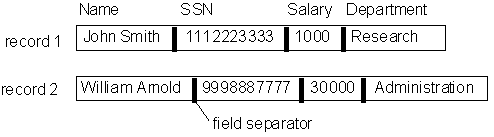
Therefore, the record is stored with each subsequent attribute separated by the next by a special ASCII character called a field separator.
Of course, in each block, there we may place many records. Each record is separated from the next, again by another special ASCII character called the record separator.
The figure below shows a typical arrangement of the data on a disk.
The records of such a table may be stored, typically, in a large file, which runs into several blocks of data. The physical storage may look something like the following:

The simplest method of storing a Database table on the computer disk, therefore, would be to merely store all the records of a table in the order in which they are created, on contiguous blocks as shown above, in a large file. Such files are called HEAP files, or a PILE.
We shall examine the storage methods in terms of the operations we need to perform on the Database:
In a HEAP file:
Operation: Insert a new record
Performance: Very fast
Method: The heap file data records the address of the first block, and the file size (in blocks). It is therefore easy to calculate the last block of the file, which is directly copied into the buffer. The new record is inserted at the end of the last existing record, and the block is written back to the disk.
Operation: Search for a record (or update a record)
Performance: Not too good ( on an average, O(b/2) blocks will have to be searched for a file of size b blocks.)
Method: Linear search. Each block is copied to buffer, and each record in the block is checked to match the search criterion. If no match is found, go to the next block, etc.
Operation: Delete a record
Performance: Not too good.
Method: First, we must search the record that is to be deleted (requires linear search). This is inefficient. Another reason this operation is troublesome is that after the record is deleted, the block has some extra (unused) space. What should we do about the unused space ?
To deal with the deletion problem, two approaches are used:
(a) Delete the space and rewrite the block. At periodic intervals (say few days), read the entire file into a large RAM buffer and write it back into a new file.
(b) For each deleted record, instead of re-writing the entire block, just use an extra bit per record, which is the 'RECORD_DELETED' marker. If this bit has a value 1, the record is ignored in all searches, and therefore is equivalent to deleting the record. In this case, the deletion operation only requires setting one bit of data before re-writing the block (faster). However, after fixed intervals, the file needs to be updated just as in case (a), to recover wasted space.
Heaps are quite inefficient when we need to search for data in large database tables. In such cases, it is better to store the records in a way that allows for very fast searching.
The simplest method to do so is to organize the table in a Sorted File. The entire file is sorted by increasing value of one of the fields (attribute value). If the ordering attribute (field) is also a key attribute, it is called the ordering key.
The figure below shows an example of a sorted file of n blocks.

How about the performance of operations on sorted files ?
Operation: Search for a record (or update a record)
Performance: Quite fast ( on an average, O(Log b) blocks will have to be searched for a file of size b blocks.)
Method: Binary search. For a file of b blocks, look at the block number b/2. If the searched value is larger than the ordering attribute value at this block, then the required record must be in some block between block b/2 and block b. Repeat search by getting the middle block between blocks b/2 and b. And so on..
Problems: what if we need to update the ordering field? This would create a bad ordering, and therefore requires a combination of record deletion and insertion: very inefficient!
Operation: Delete a record
Performance: Quite fast.
Method: First, we must search the record that is to be deleted (we can use the efficient binary search). Of course, after the record is deleted, we still need to perform the usual file compacting once every few days.
Operation: Insert a new record
Performance: Very inefficient.
Method: If we insert the new record in its correct ordered position, we would need to shift every subsequent record in the table! This is of course too expensive, and cannot be done.
Solution: Typically, the way this problem is handled is by adding new records into a new file, called the overflow file. Once every few days, the overflow file is merged with the ordered file to create the complete ordered table.
What does this mean in terms of the Operations above?
For each operation, including the search operation, we use binary searching in the regular file. If we cannot find a matching record, we also need to perform a linear search in the overflow file, to look for any matching record. Note that since the overflow file is not ordered, it requires a linear search.
Can we do better than binary searching?
Yes! By using Hashing Functions
Hashing is usually implemented by storing the records of a DB in arrays. Each row of the array is of a fixed size, and stores one record.
How much storage must be reserved for each row?
Enough to store the largest possible value for each attribute of the table.
How does Hashing work?
A Hash function basically computes the array index of each record using one of the attributes (for example, the Key attribute). A typical Hash function:
Block Address = K mod M.
Where:
K is a number equivalent to the value of the Hashing Attribute (or the Hashing Key);
M is the size of the array allocated to store the entire table.
Operation: Insert a record.
Performance: Almost constant time (very fast !).
Procedure: Using the Hash Key, we first calculate (K mod M). Then we look if the memory location indicated by the array index = (K mod M) is free. If so, we store the record at that location. If not, we store the record in the next array index address that is free. (If we reach the end of the array while searching for a free location, just go to array index = 0, and continue looking for the first free spot).
Operation: Search for a record
Performance: Quite fast ! (Almost constant time)
Procedure: Similar to that for insertion in a hash array, but a lot of extra effort is needed if the searched record is not found at the calculated address (WHY ?).
Operation: Deletion of a record.
Performance: Same as for Searching for a record.
All the above are techniques used by the DBMS's to physically store each of the tables in a Database.
In addition, most DBMS's provide another mechanism to quickly search for records, at the cost of using some extra disk space. This is the use of INDEXES.
What is an INDEX ?
In a book, the index is an alphabetical listing of topics, along with the page number where the topic appears.
The idea of an INDEX in a Database is similar. We will consider two popular types of indexes, and see how they work, and why they are useful.
Primary Indexes
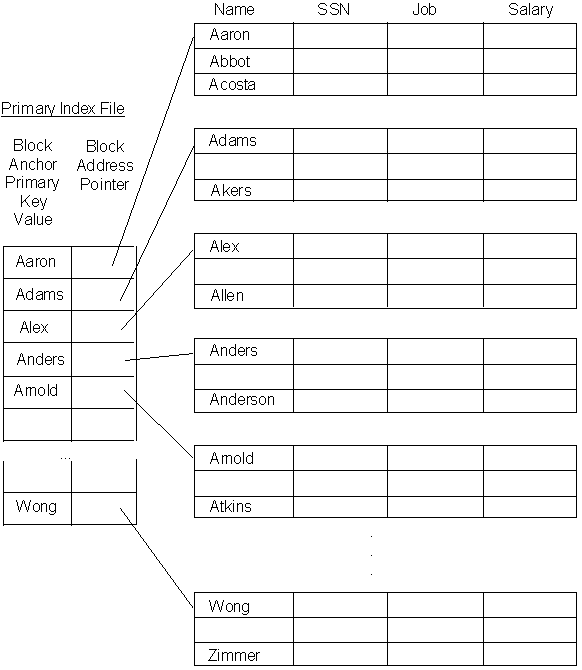
Consider a table, with a Primary Key Attribute being used to store it as an ordered array (that is, the records of the table are stored in order of increasing value of the Primary Key attribute.)
As we know, each BLOCK of memory will store a few records of this table. Since all search operations require transfers of complete blocks, to search for a particular record, we must first need to know which block it is stored in. If we know the address of the block where the record is stored, searching for the record is VERY FAST !
Notice also that we can order the records using the Primary Key attribute values. Thus, if we just know the primary key attribute value of the first record in each block, we can determine quite quickly whether a given record can be found in some block or not.
This is the idea used to generate the Primary Index file for the table. We will see how this works by means of a simple example.
Problem:
The Primary Index will work only if the file is an ordered file. What if we want to insert a new record ?
Answer:
We are not allowed to insert records into the table at their proper location. This would require (a) finding the location where this record must be inserted, (b) Shifting all records at this location and beyond, further down in the computer memory, and (c) inserting this record into its correct place.
Clearly, such an operation will be very time-consuming !
Solution:
The solution to this problem is simple. When an insertion is required, the new record is inserted into an unordered set of records called the overflow area for the table. Once every few days, the ordered and overflow tables are merged together, and the Primary Index file is updated.
Thus any search for a record first looks for the INDEX file, and searches for the record in the indicated Block. If the record is not found, then a further, linear search is conducted in the overflow area for a possible match.
Secondary Indexes
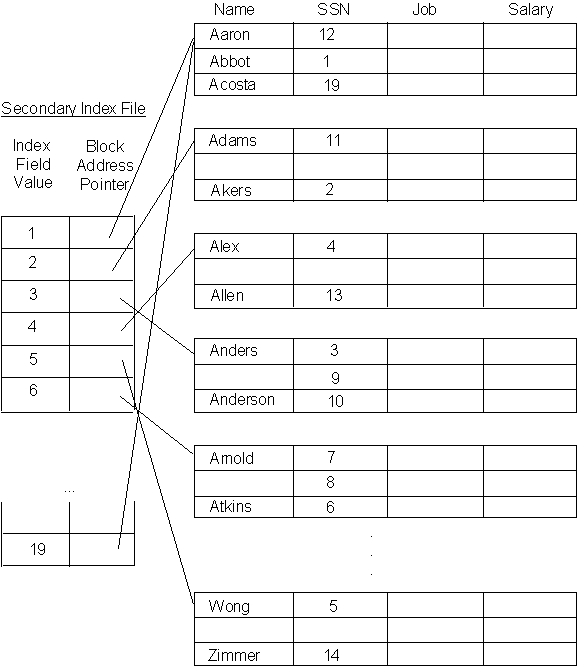
Apart from primary indexes, one can also create an index based on some other attribute of the table. We describe the concept of Secondary Indexes for a Key attribute (that is, for an attribute which is not the Primary Key, but still has unique values for each record of the table). In our previous example, we could, for instance, create an index based on the SSN.
The idea is similar to the primary index. However, we have already ordered the records of our table using the Primary key. We cannot order the records again using the secondary key (since that will destroy the utility of the Primary Index !)
Therefore, the Secondary Index is a two column file, which stores the address of EVERY tuple of the table !
The figure below shows the secondary index for our example:
NOTE:
Unlike the Primary Index, where we need to store only the Block Anchor, and its Block Address, in the case of Secondary Index Files, we need to store one entry for EACH record in the table. (WHY ?)
Therefore, secondary index files are much larger than Primary Index Files.
You can also create Secondary Indexes for non-Key attributes. The idea is similar, though the storage details are slightly different.
You can create as many indexes for each table as you like !
[Why would we like to create more than one Index for the Same Table ?]
Creating Indexes using SQL
Example:
Create an index file for Lname attribute of the EMPLOYEE Table of our Database.
Solution:
CREATE INDEX myLnameIndex ON EMPLOYEE( Lname);
This command will create an index file which contains all entries corresponding to the rows of the EMPLOYEE table sorted by Lname in Ascending Order.
Example:
You can also create an Index on a combination of attributes:
CREATE INDEX myNamesIndex ON EMPLOYEE( Lname, Fname);
Finally, you can delete an index by using the following SQL command:
Example:
DROP INDEX myNamesIndex;
which will drop the index created by the previous command.
Note that every index you create will result in the usage of memory on your Database server. This memory space on the hard Disk is used by the DBMS to store the Index File(s). Therefore, the advantage of faster access time that you get by creating indexes also causes the usage of extra memory space.